Changelog
Everything that ships to nanoodle, newest first — the same entries as the in-app 📣 Updates panel. Last update: 19 October 2026.
19 October 2026
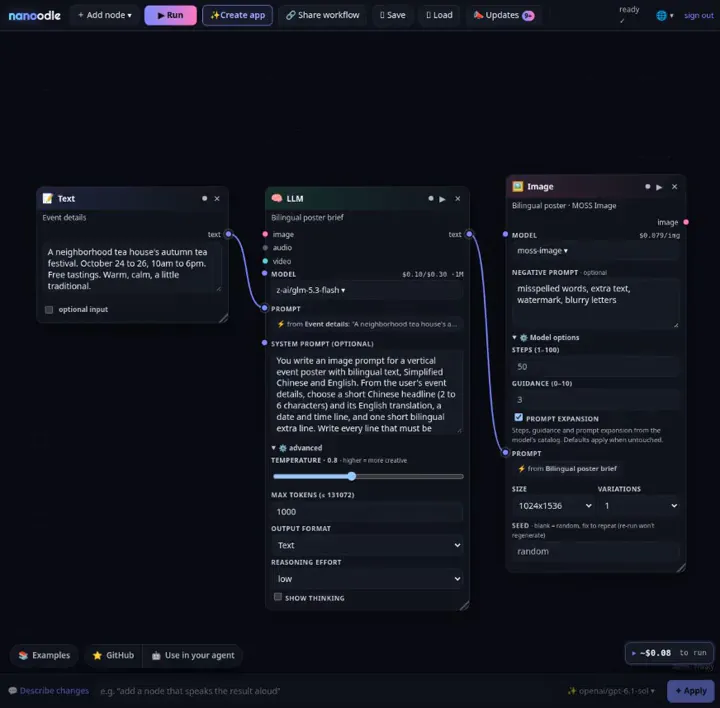
- 🀄 MOSS Image is on nanoodle ($0.052 at 1024×1024). In our tests it lettered Chinese and English exactly on every try, and kept a two-column layout that Nano Banana 2.1, FLUX.3 and GPT Image 2 rearranged. The Image node now shows its Negative prompt, and Steps, Guidance and Prompt expansion under ⚙️ Model options. Try the new Event details → bilingual poster example, or see it next to four other models in the midnight-ramen poster arena.
16 October 2026
- New gallery example: Same shot, three looks — one Muse still, then Muse Edit ladders glass → watercolor → photoreal on a locked composition, with a quiet Seedance ambient bed.
- Music node Samples knob now bills Mirelo SFX 2.0 num_samples correctly (SFX-aware pricing on the Music node).
- New video model: ByteDance OmniHuman v2 — ByteDance OmniHuman v2 turns a human image and a WAV or MP3 audio track into an expressive avatar video. Add an optional prompt to guide the scene, movement and camera.
- New LLM model: Muse Spark Open — Muse Spark Open brings Meta’s open-weight 816B-A42B model for coding, codebase understanding, and agentic tool use to NanoGPT.
- New LLM model: Orion 26B A4B v1.1 — TheDrummer's Gemma 4 fine-tune is built for creative writing, roleplay, and expressive dialogue, with optional thinking, a 65,536-token context window, and up to 8,192 output tokens.
- New LLM models: Moondream 3 Preview & Moondream 3.1 — Moondream 3 Preview and its distinct successor Moondream 3.1 support text, image questions, captioning, OCR, and optional reasoning. Both use 9B total parameters with 2B active per token.
- New video models: HeyGen Avatar IV & HeyGen Avatar V — HeyGen Avatar IV animates a portrait image or preset avatar from recorded speech, with up to 1080p output. HeyGen Avatar V uses eligible preset avatars with up to 4K MP4 output.
15 October 2026
- New LLM model: Gemma 4 12B Starry Ocean — Gemma 4 12B Starry Ocean is now available and included in your subscription.
- New LLM model: Ultramarine 1 Flash — Built for finance, law, consulting, and operations, it was trained on assignments such as building Excel models, editing PowerPoint decks, and drafting Word memos.
- New LLM model: Gemini 4 Argon — You can now pick a service tier for Gemini 4 Argon right in chat: open Setup and choose Standard, Flex, or Priority.
- New video model: Generate a video soundtrack — Mirelo SFX 2.0 is now available for creating sound effects and ambience from text or synchronized soundtracks from video. It can preserve existing speech while adding surrounding sounds.
- New video model: AI Video Translator — Dub talking videos into 28 languages while keeping each speaker’s cloned voice and speech timing.
- New LLM models: Apertus 1.5 8B & Qwen SEA-LION v4 32B & Gemma SEA-LION v4 27B & Bielik 11B v3.0 — Built by the Swiss AI Initiative, it makes its weights, training data and recipes open, with multilingual chat and a 262K context window.
- New LLM model: Nvidia Nemotron 3.5 Super VL — Nvidia Nemotron 3.5 Super VL is now available and included in your subscription!
- New image models: FLUX.3 Image Klein & Klein Base — Create images with precise layouts and expressive typography, or add reference images to edit text, transfer styles, and compose objects into a new scene.
14 October 2026
- New LLM model: Gemini 4 Argon — Gemini 4 Argon now supports Flex and Priority service tiers. Flex costs 50% less than Standard when you can wait, while Priority costs 80% more for higher-priority processing.
- New LLM model: LFM2.5 24B A2B — This text reasoning model uses 2.45B active parameters out of 24B total, with tool calling, structured output, and a 128,000-token context window for agent workflows.
- Retired: Sora 2 — Sora 2 has now been retired and is no longer available for new video generations. Existing Sora 2 generations remain identified correctly in your history. For a current alternative, try Kling 3.0 Pro.
13 October 2026
- LLM node now takes video — wire a clip into a video_input chat model (Gemini 4 Argon and friends) to ask about what happens on screen.
- New LLM models: Qwen 3.8 27B Uncensored & Thinking variant — Qwen 3.8 27B Uncensored and its Thinking variant are no longer included in the subscription. Both variants remain available through pay-as-you-go billing using your account balance.
- New LLM models: GLM 5.2 & GLM 5.2 Thinking — We have restored the extra included input tokens deducted for GLM 5.2 and GLM 5.2 Thinking between the switch to 2x on October 12 and October 13 at 07:13:36 UTC.
- New LLM model: Gemini 4 Argon — Google's flagship reasoning model is built for complex software engineering, mathematical and scientific problem solving, and multi-step agents.
12 October 2026
- New LLM models: GLM 5.2 & GLM 5.2 Thinking & GLM 5.3 & GLM 5.3 Thinking — GLM 5.2 and GLM 5.2 Thinking now count at 2x toward included input-token usage in the subscription. GLM 5.3 and GLM 5.3 Thinking now count at the regular 1x multiplier.
- New LLM model: TheDrummer Skyfall 31B v4.2 — TheDrummer Skyfall 31B v4.2 is now available and included in your subscription. This 31B model is built for creative writing, roleplay, and dialogue, with a 16K-token context window.
- Pricing: Qwen 3.8 27B Uncensored & Thinking variant — Pay-as-you-go pricing for Qwen 3.8 27B Uncensored and its Thinking variant is now $1 per million input tokens, $3 per million output tokens, and $0.22 per million cached input tokens.
- New LLM model: Muse Wonder — Meta's new frontier reasoning model for complex personal and professional agentic tasks.
- Retired: Bria Guided Background Removal — Upload an image and describe which objects to keep, drop, or isolate, or leave the prompt blank for standard background removal.
10 October 2026
- New image model: Qwen Image 2.1 Turbo — Qwen Image 2.1 Turbo is now available for image generation and editing.
9 October 2026
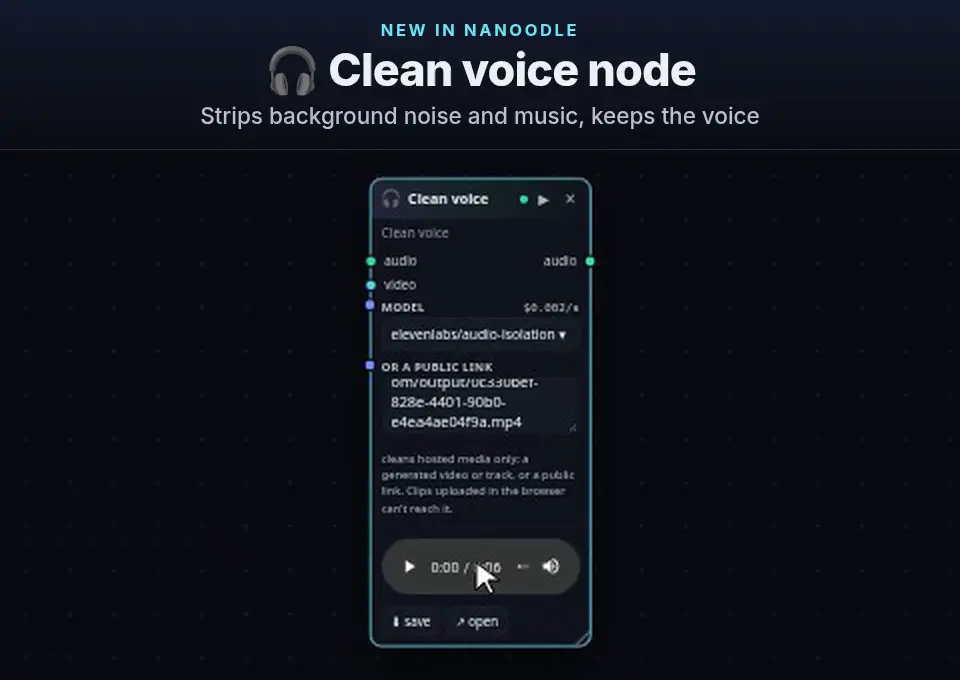
- 🎧 New Clean voice node: it strips background noise and music and keeps the voice, using ElevenLabs Audio Isolation (about $0.12 a minute) or the cheaper VEED Clean Audio. Wire in a generated video or track, or paste a public link to a recording. NanoGPT fetches the file from its link, so clips uploaded in the browser can't be cleaned yet. Wire the result into 🎚 Soundtrack to put the clean voice back on the video.
- New LLM model: GPT-6.1 Sol — GPT-6.1 Sol now supports Ultrafast for faster token generation. Select Ultrafast alongside Flex and Fast in the chat settings, or set service_tier to "ultrafast" in API requests.
8 October 2026
- 📣 Updates entries can now show a short usage clip of the feature. It plays inline as you scroll the panel, and a click opens it large. The changelog page links each clip too.
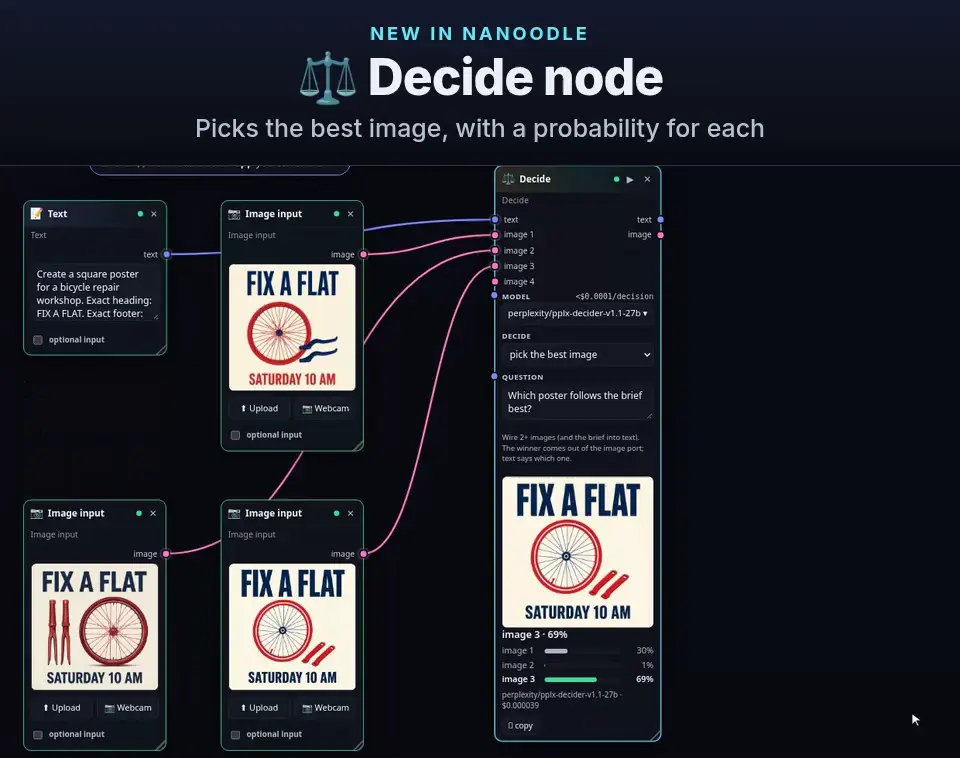
- New ⚖️ Decide node: ask a decision model one typed question — pick the best of up to 4 images, choose a label, score on a scale, or yes/no — and get probabilities back for a fraction of a cent. Turn on the yes/no gate to stop the rest of the run (unbilled) when the answer is no.
- New video model: MiniMax H3 Max Relight — Relight an existing video with exactly one lighting-reference image while preserving the source subjects, motion, camera, setting, and audio. Choose 480p, 768p, 1080p, or 2K output.
- New LLM models: Gemma 4 26B A4B Chimera X Heretic & Gemma 4 31B Scarlet — Gemma 4 26B A4B Chimera X Heretic and Gemma 4 31B Scarlet are now available and included in the subscription.
7 October 2026
- Pricing: A Better API Pricing Hub — The API pricing hub now brings text and image model rates together in searchable tables.
- New image model: Recraft SVG Edit — Recraft SVG Edit lets you upload an existing SVG, describe the changes you want, and create a new SVG with editable vector shapes.
- New LLM model: Auto Model — Auto Model can now choose how deeply to reason for each message: simple questions can skip thinking, while harder requests get more.
- New LLM model: Claude Haiku 5.5 — Anthropic's fastest and most capable small model is built for high-volume, cost-sensitive work, with strong performance across coding, computer use, knowledge work, and live support.
- New audio models: Mureka Instrumental & Mureka Lyrics & Mureka Podcast & Mureka Song & Mureka Lyrics Video — Create instrumental tracks, turn ideas into lyrics, produce multi-voice podcasts, or generate complete songs from lyrics or a creative prompt.
- New video model: Vidu Q4 — Animate still images with motion and sound, or use reference images and voice clips to keep characters, products and voices consistent across scenes.
6 October 2026
- MiniMax H3 with a LoRA and reference images now includes $0.02 per reference in the estimate (it used to leave that out).
- Describe changes keeps your custom node titles (it used to reset them to Text, LLM, Image), and model pickers now open scrolled to the model you're using.
- Describe changes and Customize now write your edits with GPT 6.1 Sol at medium reasoning effort by default. If you already picked a model, it stays picked.
- Kandinsky 6 Lite and Pro now show their real per-clip price before you send: $0.16 and $1.35 from a prompt, $0.17 and $1.40 from a starting image. The estimate used to read $25.
- New video models: Kandinsky 6 Lite & Kandinsky 6 Pro — Create short videos with synchronized sound from a prompt or animate a starting image. Lite is built for quick drafts; Pro supports more detailed scene direction and camera movement.
- New video model: AI Video Captioner — Turn talking videos into captioned clips with animated word timing, keyword highlights and emoji.
- New LLM model: Mistral Large 4 — This open-weight model supports reasoning, coding, image understanding, tool calling, and structured output. Its 512K-token context window lets you work with long documents and large codebases.
- New image model: Nano Banana 2.1 — Create detailed product shots, posters with readable text, and panoramic scenes, or combine reference images into a new composition.
5 October 2026
- Grok Imagine Video 1.5 Lite (and MiniMax H3 Max Turbo Extend) now update the pre-send estimate with duration and resolution, matching NanoGPT's generation quote. A 15s 1080p clip no longer shows the $0.02 floor.
- New LLM models: Apex Flash 1 & Apex Flash 1 Abliterated — Apex Flash 1 and Apex Flash 1 Abliterated are now available and included in the subscription. These cybersecurity finetunes of GLM 5.3 Flash support code investigation, reasoning, and tool use.
4 October 2026
- Updated: Sakana Namazu is available again — the Japanese-specialized model combines reasoning, coding, tool use, image and PDF understanding, and structured output with natural Japanese and a deep understanding of Japanese culture and business contexts.
3 October 2026
- New image model: Marigold V2 Depth — Upload a single photo to estimate scene depth and receive a colorized depth map for understanding foreground and background structure, without writing a prompt.
2 October 2026
- New image model: FLUX.3 Image — Create detailed editorial photographs, illustrations, product shots, and designs with accurate typography, including native 4K images. It also edits existing images and combines up to 10 references for background swaps, poster text changes, and local edits.
- New video model: Grok Imagine Video 1.5 Lite — Create short scenes from a prompt or animate a starting image with the lighter Grok Imagine 1.5 variant.
- New video model: MiniMax H3 Max Recast — Replace the people in a video using reference photos while preserving the original motion, camera, shot timing, and soundtrack.
- New video model: MiniMax H3 Max Turbo Extend — Continue existing footage from a prompt, with optional audio references to guide the new scene.
1 October 2026
- Empty-canvas and wire help got sharper inside the menus you already use — a useful first-node suggestion on a blank board, distinct rings on wire-drag targets, compatible nodes when a wire lands on empty canvas, a port + that adds and wires a suggestion, drop-together connect previews, and missing inputs that stay marked until you fix them.
- New audio model: VEED Clean Audio — Remove background noise from speech recordings while preserving quiet and distant words.
- New image models: Ideogram V4.5 & Ideogram V4.5 Edit — Create posters, logos, packaging, and designs with accurate typography, or edit existing images with reference artwork and precise control over which parts change.
- New video models: HeyGen Video 1 & Video Music Remover — HeyGen Video 1 creates short scenes with generated dialogue, ambience, and sound effects from a prompt, image, or video/audio references. Video Music Remover strips background music from existing footage while keeping dialogue, sound effects, and the picture.
- New LLM model: Pareto 26.10 Preview — Pareto 26.10 Preview is now available for research, coding, and agentic workflows, with text and image input, tool calling, and a 1M-token context window.
30 September 2026
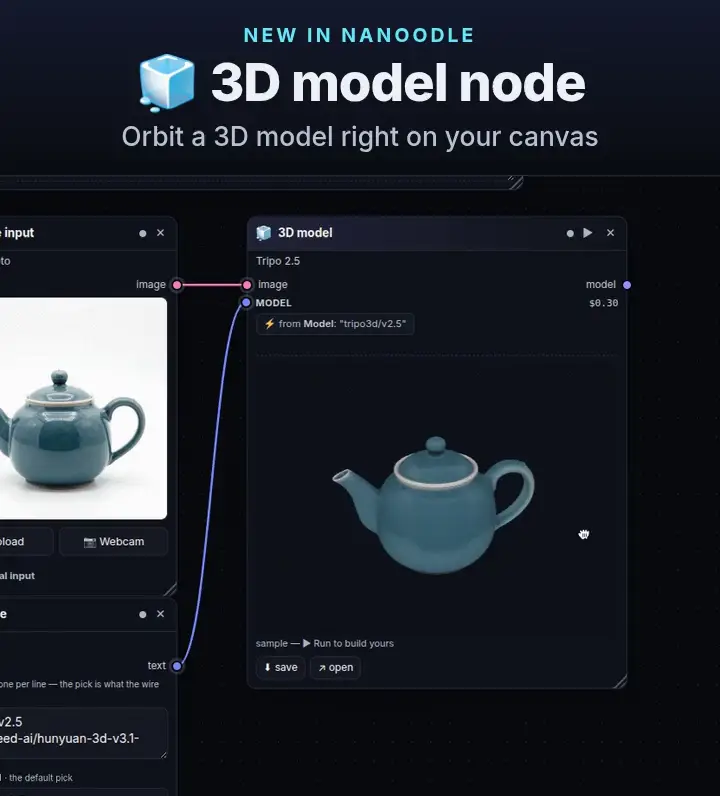
- New 🧊 3D model node — NanoGPT's 3D models (default Tripo 2.5), drop or upload a .glb, 3D wires, a lazy orbit viewer, and a Teapot → Tripo teaching example you can spin.
- MiniMax H3 Singularity (and the other H3 models that only publish a minimum) now update the pre-send estimate with duration and resolution, matching NanoGPT's generation quote. A 15s clip no longer stays stuck on the short-clip floor.
- New LLM model: Ling 3.1 Flash — Ling 3.1 Flash is now available and included in the subscription.
- New video model: Pixelcut Looping Video — Turn one product photo into a seamless video loop with a locked camera and subtle ambient movement or a full 360° spin.
29 September 2026
- Wan 3.0 Spicy (and the Wan 3.0 family) can go up to 30s — duration knobs and per-second price estimates now match the live NanoGPT catalog. Fixed-length video models no longer show a leftover 5/10s knob that inflated the estimate.
- New LLM models: GPT-6.1 Sol & GPT-6.1 Sol Pro — OpenAI’s latest Sol model delivers near-Astra performance at a lower cost for complex coding, computer use, and professional work.
- Retired: Legacy GPT-4o Image — The legacy gpt-4o-image model has been retired and no longer accepts new generations.
28 September 2026
- Suggested adds follow Examples recipes and common wire ports, soft-steer away from a shallow Text→LLM loop, slide overlapping new cards apart, and remember suggestions you keep skipping — still inside the menus you already use.
- New LLM models: Claude Sonnet 5.5 & Claude Sonnet 5.5 Thinking — Claude Sonnet 5.5 is now available, with stronger coding and tool use, better understanding of images and charts, and clearer writing for documents, presentations, and everyday work.
27 September 2026
- New LLM model: LongCat 2.5 Preview — LongCat 2.5 Preview is now available and included in the subscription.
- New LLM model: CyberHeabsy — CyberHeabsy is now available for authorized security research, red-team practice, roleplay, and creative writing.
26 September 2026
- New LLM model: GLM 5.3 Uncensored — GLM 5.3 Uncensored is now available for chat, creative writing, coding, reasoning, and tool use. This experimental release is based on the full GLM 5.3 model.
- New image model: VOSR2 Image Upscaler — Restore and upscale photos to 2K or 4K in a single pass while preserving the original composition, colors, faces, and fine details.
25 September 2026
- Next-action tips live inside the menus you already use — confident suggestions rank and mark rows in add-node, wire-drop, and the model picker; while dragging a wire, one compatible port gets a soft highlight. No floating panel or ghost overlay.
- New LLM model: MiMo V2.6 Flash Uncensored — MiMo V2.6 Flash Uncensored is now available for text-only chat, creative writing, coding, and long-context work.
- New LLM model: Perceptron Mk1.5 — Analyze images, video, and audio, reason about physical scenes, and use tools to act on what the model sees.
- New LLM model: Qwen3.8 27B Uncensored TEE — This lower-refusal finetune supports creative writing, coding, image analysis, reasoning, and tool use with a 262K-token context, running inside a Trusted Execution Environment.
- New video model: MiniMax H3 Max Extend — Describe what happens next to continue an existing video, preserving the scene as the action develops.
- New audio model: Gemini 3.8 Flash TTS — Create expressive narration and two-speaker dialogue, with natural delivery for voiceovers, stories, and conversations.
24 September 2026
- LLM reasoning effort follows each model's NanoGPT catalog — Solar Mini 4 Thinking shows none|low|medium|high (defaults to medium); levels like xhigh/max appear when the model lists them instead of a fake default.
- New LLM model: Clover 1 150B Preview — Meet Clover 1 150B Preview, the Kitani model you may have tried as Lumen Stealth.
- New LLM model: Ember 1 — Built on Kimi K3, this reasoning model is designed to tackle complex questions with shorter reasoning traces. It accepts images, can call tools, and has a 1M-token context window.
23 September 2026
- New LLM models: Solar Mini 4 & Solar Mini 4 Thinking — This compact 35B mixture-of-experts model has 3B active parameters and a 524K-token context window.
- New image models: Seedream 5.0 Flash & Seedream 5.0 Flash Layerize — Seedream 5.0 Flash is now available for fast image generation and prompt-guided edits.
- New LLM models: Aion 3.5 & Aion 3.5 Mini — Both use collaborative generation to build immersive roleplay and long-form stories with stronger narrative structure, tension, and nuanced treatment of mature themes.
- New image model: Recraft V4.1 Flash — Generate design-focused images quickly to test compositions, refine prompts, and explore creative directions.
- Updated: GPT-6 Sol, GPT-6 Sol Pro, GPT-6 Luna & GPT-6 Luna Pro — all four now support Flex and Priority service tiers.
- New LLM model: Space Bunny Alpha — This anonymous experimental model is built for fast coding and complex tasks. It works with text, images, and video, can use tools, and supports up to 1M tokens of context.
- New LLM model: Qwen3.8 Max Prime — This higher-throughput version of Qwen3.8 Max is suited to coding, complex analysis, and long-running agent workflows.
22 September 2026
- Pricing: Abliterated Model & Abliterated Model Large & Abliterated Model Large V2 — Abliterated Model, Abliterated Model Large, and Abliterated Model Large V2 are now cheaper to use. Input and cached-input prices have been reduced, while output prices remain unchanged.
- New LLM model: Claude Opus 5.5 — Anthropic's new flagship model improves agentic coding, computer use, complex knowledge work, and long-running tasks while using fewer tokens, responding faster, and communicating more naturally than Opus 5.
- New LLM models: GPT-6 Sol & GPT-6 Sol Pro — GPT-6 Sol is OpenAI's cost-efficient high-end GPT-6 model for demanding professional work, reasoning, coding, and agentic workflows.
- New LLM model: Lumen Stealth — an experimental stealth preview, revealed on Sep 24 as Clover 1 150B Preview and now included in the NanoGPT subscription.
- New LLM models: GPT-6 Luna & GPT-6 Luna Pro — GPT-6 Luna is a fast, cost-efficient GPT-6 model for chat, classification, and lightweight agent workflows. GPT-6 Luna Pro uses additional reasoning for more complex tasks.
21 September 2026
- Avatar node now only lists true talking-avatar models — omni and reference-to-video lines (H3 reference-to-video, Wan Prime, Seedance omni) no longer become the default and drop your voice track.
- Image models that advertise aspect_ratio now send it — Qwen Image 2.1, Anima, and friends keep your chosen frame instead of the API default.
- Audio picker prices tell the truth — Lyria / HeartMuLa / VibeVoice show the real per-gen fee instead of $0.000; speech and music estimates follow duration; Yue2 respects mp3/wav/flac.
- Wan 3.0 Edit & Extend (and Prime twins) keep a duration knob on Video-edit — no more silent 5s default.
- ElevenLabs Music v2/v2.5 now price by billing interval — estimates and the picker match the catalog.
- Qwen Image 2.1 LoRA models take up to three numbered adapters — slots 2–3 no longer get silently dropped.
- New LLM model: Qwen 3.8 27B Hemingway — Qwen 3.8 27B Hemingway is now available and included in the NanoGPT subscription! Aoru serves this Qwen 3.8 27B finetune in NVFP4 with configurable reasoning and a 262,144-token context window.
- New image model: Qwen Image 2.1 — Its compact 7B visual generation model unifies image creation and editing, with native transparent-image support, improved typography and portrait detail, precise local edits, and compositions built from up to ten…
- Pricing: X Search Item-Based Pricing — X Search on the Responses API is now billed by returned item instead of by tool call. Each returned X post costs $0.005, and each returned X user profile costs $0.01.
- New LLM model: Grok 4.7 — SpaceXAI's new flagship reasoning model improves coding, long-running software engineering, agentic tasks, and knowledge work, with stronger self-verification across complex workflows.
- New LLM models: MiMo V2.6 Flash & MiMo V2.6 Pro & MiMo V2.6 Pro UltraSpeed — Xiaomi's open-source native omnimodal models understand text, images, video, and audio with a 1M-token context window, and are built for coding, long-horizon agents, visual tasks, research, and cybersecurity.
20 September 2026
- Retired: DeepSeek V4 Flash TEE — TEE/deepseek-v4-flash has been retired because its TEE deployments are no longer available.
- New LLM model: Step 5 Preview — StepFun's new flagship model is built for production-scale agents, with particular strength in software engineering, long-horizon tool use, professional knowledge work, and finance.
19 September 2026
- New LLM models: Qwen 3.8 27B Cybersecurity & Gemma 4 26B A4B Cybersecurity & GLM 5.3 Flash Cybersecurity & Nemotron 3.5 Content Safety — Qwen 3.8 27B Cybersecurity, Gemma 4 26B A4B Cybersecurity, and GLM 5.3 Flash Cybersecurity are now available for security research and coding, with image understanding and tool calling.
- New LLM model: DiffusionGemma — a high-speed diffusion-based version of Gemma 4 26B A4B with optional reasoning and a 262K-token context window.
- New audio model: Google Lyria 3.5 — Turn detailed prompts into full-length music, blend genres and instrumental styles, and shape vocal delivery, song structure, and musical dynamics through text.
18 September 2026
- New image models: Bria Product Holding & Bria Virtual Try-On — Upload a person photo plus one to three product, garment, or accessory references to create natural product-presentation shots or realistic outfit previews while preserving the subject and original scene.
- New LLM model: Pareto — Pareto is now available as an experimental model. It is a multimodal composite model that runs several frontier and open models for each request, then returns one selected or synthesized answer.
- New video models: Wan 3.0 Video Edit & Wan 3.0 Prime Video Edit & Wan 3.0 Video Extend & Wan 3.0 Prime Video Extend — Wan 3.0 Video Edit, Wan 3.0 Prime Video Edit, Wan 3.0 Video Extend, and Wan 3.0 Prime Video Extend are now available.
- New video model: MiniMax H3 Max Lip Sync — Turn a portrait or character image and a voice or music track into a short high-resolution performance with synchronized mouth movement. It supports talking and singing clips from 480p through 2K.
- New video models: MiniMax H3 Reference-to-Video & LoRA variant — Generate coherent 3–15 second clips from a prompt and up to nine image, three video, or three audio references, preserving subjects, motion, and scene continuity with native stereo audio.
- New video models: MiniMax H3 Singularity Image-to-Video & LoRA variant — Animate a first-frame image into a coherent 3–15 second clip with native stereo audio, optional last-frame guidance, and flexible resolution tiers.
17 September 2026
- Anima + MiniMax H3 LoRA stacks now bill on the default engine — up to three adapters as numbered slots (lora_url_1..3), matching the catalog.
- New LLM model: Gemma 4 31B Split-Untied — Gemma 4 31B Split-Untied is now available and included in your subscription!
- New LLM model: Qwen3.8 Omni Flash — It understands text, images, audio, and video, making it well suited to meeting summaries, transcripts and subtitles, speaker-aware audiovisual analysis, and detailed content review.
- New video models: Wan 3.0 Spicy Image-to-Video & Wan 3.0 Prime Spicy Image-to-Video — Turn a still image into an unrestricted cinematic video with synchronized audio, or add an optional final frame to guide the transition and ending. Choose Prime for faster generation.
- New video models: P-Video 2 Pro & P-Video 2 Pro Image-to-Video — Built on MiniMax H3, it creates cinematic clips with generated audio from text or a starting image.
- New video model: Seedance 2.5 Talking Avatar — Turn a portrait and voice recording into a natural talking-avatar video with expressive facial motion, lip sync, and optional direction for gestures or presentation style.
15 September 2026
- Restored Custom endpoint as an editor-only Examples teaching card — Receipt → Path (/post|/anything) → POST. Choice retargets the echo URL; $0, no key, no See result.
- Examples dropped Pocket mystery — pure slop, not a shelf card. Mikkel wants fun-useful workflows, not engineer dumps.
- New Examples card: Neon shrine duel — seed → GLM → Anima still → GLM → MiniMax H3 Max fight clip (~$0.27). Both fighters stay framed.
- Retired: CrofAI Permanently — CrofAI has been permanently removed as a provider from NanoGPT. Provider selection, direct CrofAI model routes, and CrofAI BYOK are no longer available.
- New LLM model: DeepSeek V4 Flash 0731 — Netra Runtime is now available in provider selection for DeepSeek V4 Flash 0731, including its thinking variant. It supports streaming, prompt caching, native tool calling, and parallel tool calls.
- New LLM model: GLM 5.3 Flash — Pareto Inference is now available as a provider selection option for GLM 5.3 Flash. Choose Pareto in provider selection, or append :pareto to the model name in API requests.
- New audio models: ElevenLabs Music v2 & Music v2.5 — Turn natural-language direction into complete vocal songs or instrumental tracks for songwriting, background music, social content, and ads.
14 September 2026
- Retired: Private Mode GLM 5.2 — GLM 5.2 and GLM 5.2 Thinking are no longer available in Private Mode. If you run the local proxy, stop it and restart with NANOGPT_API_KEY=...
- New LLM model: DeepSeek V4.1 Flash — Runware is now available in provider selection for DeepSeek V4.1 Flash, including its thinking variant.
13 September 2026
- New LLM model: DeepSeek V4.1 Flash TEE — It combines text and image understanding with reasoning, tool calling, and structured output across a one-million-token context window.
- New image models: Anima & Anima LoRA — Anima is now available for fast, tag-driven anime illustrations at native 1K or 1.5K resolution, including variations guided by an uploaded image.
- New audio models: Yue2 3B Text-to-Music & Yue2 3B Music-to-Music — Turn structured lyrics and a style description into a complete vocal song, or use a reference track to create a fresh rendition with a new musical direction.
11 September 2026
- Examples shelf cut to five useful workflows — Game character kit, Compare four image models, From scene to short clip, Sing, and A presenter for your script. Connections that do real work stay; single-call wrappers, repeated radio scenes, and cover-only cards are gone (Iron Verdict remains as the worked game companion). Browse nanoodle.com/examples/gallery/
- Music / audio model picker: Newest now surfaces late-added lines (Mureka v9.5, Music 3) above early ones — NanoGPT still stamps every audio model with the same created time, so we reverse the catalog’s oldest-first order and keep higher versions first within a family.
- New video models: P-Video 2 & P-Video 2 Image-to-Video — Create short scenes with generated audio from a prompt, or bring a still image to life with P-Video 2 Image-to-Video.
- New LLM model: Fugu Max — Sakana AI's multi-agent model coordinates expert models for reasoning, coding, and tasks that use tools.
10 September 2026
- New Examples card: widen the frame — upload Product still → `nano-banana-edit` at auto (~$0.039). First-click is a tight Volt night-ride radio crop; Banana Edit outpaints a 16:9 night-alley hero. Cover reuses existing Volt radio art; true Banana Edit QC pending. Distinct from Muse Edit, H3 identity restyle, Ideogram remove text, BiRefNet, SAM 3, P-Image Upscale, Crystal / SeedVR2, FLUX VTO, and combine-images.
- New Examples card: stretch the bed — aupload Short alley bed → remix `mirelo-ai/sfx1.6/extend-audio` at duration 3 (~$0.01/s → ~$0.03@3s). First-click is a short Volt night-ride alley bed; Mirelo keeps the ambience going. Cover reuses existing Volt alley art — aupload placeholder only; no fake waveform; true Mirelo QC pending. Distinct from Wan video extend, Night-ride SFX, Mirelo video foley, and Stable Audio / sing.
- New Examples card: score the alley — text Score brief → `stable-audio-3/small/music/text-to-audio` instrumental (~$0.024/gen). First-click is a stereo night-ride bed: trip-hop pulse, rain ticks, Volt pocket radio. Cover reuses existing Volt alley art; no fake waveform; true Stable Audio QC pending. Distinct from Closing-credits song, Night-ride SFX, Night-ride radio VO, and Mirelo foley.
- New Examples card: stretch the take — upload Product clip → `wan-25-extend` at 480p / target 3s (~$0.05/s → ~$0.15). First-click is a short Volt night-ride alley clip; Wan 2.5 Extend keeps the move going. Cover reuses existing rain-radio art — vupload placeholder only; true Wan Extend QC pending. Distinct from Crystal upscale, P-Video rewrite, Mirelo foley, Wan Animate 2, Pixelcut, and still→i2v.
- New Examples card: pull the words off the take — upload Night-ride VO → `Whisper-Large-V3` (~$0.000495/min ≪$0.01). Speech→text, not TTS. Cover is an aupload placeholder; no paid QC. Distinct from Night-ride radio VO, InfiniteTalk, Night-ride SFX / Mirelo foley, and Sing.
- New Examples card: Wear the night kit — upload Person still + Garment still → `flux-pro/v1/vto` at auto (~$0.0575). First-click is a Volt night courier + night-ride jacket/tee with one cyan lightning-chevron. Cover is a local placeholder; true FLUX VTO QC pending. Distinct from combine-images, edit-a-photo, and h3-identity-restyle.
- New Examples card: drive the still with motion — still + driver → `wan-22-animate-2` at 480p (~$0.04/s, ~$0.08–0.12 for a ~2–3s driver). First-click is a Volt charcoal/cyan radio or courier still plus a simple hand-wave / turn. Cover reuses existing Volt card art; true Wan Animate 2 QC pending. Distinct from prompt-i2v (Wan 3.0 / Grok / H3 Spicy), InfiniteTalk, H3 Max orbit, and P-Video rewrite.
- New Examples card: knock the alley off the clip — upload Product clip → `pixelcut/video-background-removal` with background=black (~$0.022/30 frames, ~$0.044 for ~2s). First-click is a Volt night-ride radio take; Pixelcut drops the alley to solid black. Cover reuses existing rain-radio art; true Pixelcut QC pending. Distinct from product-cutout / BiRefNet, sam3-isolate, Crystal upscale, P-Video rewrite, and i2v.
- New Examples card: foley the take — upload Product clip → `mirelo-ai/sfx1.6/video-to-video` (~$0.01/s, ~$0.04 for ~4s). First-click is a silent Volt night-ride alley take; Mirelo lays synced SFX. Cover is a vupload placeholder (reused alley art); no paid QC. Distinct from Night-ride SFX (text→SFX), Night-ride radio VO, Wan 3.0 still+audio, and P-Video rewrite.
- New Examples card: still breathes with sound — Muse still → `alibaba/wan-3.0/image-to-video` at 480p / 2s / enable_audio=true (~$0.14). First-click is a railing-above-neon-alley Volt radio with locked-cam breath and alley hum. Cover reuses existing Volt card art; true Wan 3.0 QC pending. Distinct from frame wakes up / Grok Imagine 1.5 and photo-to-video / MiniMax H3 Spicy.
- New Examples card: Night-ride radio VO — text Spoken script → `xai-tts` at voice Leo (~$0.0023). First-click is a Volt night-board dispatch callout. Cover reuses existing courier card art; true SpaceXAI TTS QC pending. Distinct from Night-ride SFX, InfiniteTalk, Closing-credits song, and Spoken introduction.
- New Examples card: rewrite the clip — upload Product clip → `pruna-ai/p-video/edit` with draft=true (~$0.025/s, ~$0.10 for ~4s). First-click is a Volt night-ride radio take: deeper magenta rim, cooler cyan bounce, thicker rain, source audio kept. Cover reuses existing rain-radio art; true P-Video Edit QC pending. Distinct from Crystal upscale and i2v motion pins.
- New Examples card: pack type that sticks — text Pack brief → `microsoft/mai-image-2.6-flash` at 1152x864 (~$0.033). First-click is a Volt sleeve with VOLT / MIDNIGHT DROP / NIGHT CHANNEL. Cover reuses existing Volt poster art; true MAI QC pending. Distinct from Ideogram V4 Instant poster, SenseNova dispatch card, and Qwen UI mockup.
- New Examples card: frame wakes up — Muse still → `xai/grok-imagine-video/v1.5/image-to-video` at 480p / 4s (~$0.84). First-click is a rooftop-ledge Volt radio with one cyan pulse. Cover reuses existing Volt card art; true Grok Imagine 1.5 QC pending. Distinct from photo-to-video / MiniMax H3 Spicy asphalt rain.
- New Examples card: editable volt mark — text Mark brief → `recraft-ai/recraft-v4.1/text-to-vector` at 1024x1024 (~$0.08). First-click is a sharp cyan lightning-chevron SVG you can scale. Cover reuses existing Volt bolt art; true Recraft V4.1 QC pending. Distinct from Favicon (Muse glyph), Transparent brand sticker (PNG alpha), and Ideogram V4 Instant poster (letters).
- Omni Flash turntable gallery no longer plays the chrome-helmet Clip.mp4 as the Volt radio result. Cover still and first-click graph stay; true Omni Flash QC clip pending (no paid regen).
- New Examples card: Night-ride SFX — text SFX brief → `elevenlabs/sound-effects/v2` at duration 4 (~$0.008). First-click is a Volt night-ride radio sting: wet neon alley pulse, cyan thunder hit, tight decay. Cover reuses existing Volt alley art; true ElevenLabs QC pending. Distinct from Closing-credits song and TTS.
- New Examples card: Night-ride identity restyle — upload Still → `minimax-h3/image-edit` at 1k (~$0.03). First-click keeps the face and restyles into a Volt night-courier key still. Cover reuses existing courier card art; true H3 Image Edit QC pending. Distinct from Muse Edit, cinematic H3 T2I, and combine-images.
- New Examples card: Crystal video upscale — upload Product clip → `clarity-ai/crystal-video-upscaler` at target_megapixels=1 (~$0.50 for 5s). First-click is a Volt night-ride radio clip. Cover reuses existing rain-radio art; true Crystal QC pending. Distinct from P-Image Upscale and camera-orbit generate.
- Retired: Ornith 1.5 9B and Qwen 3.6 35B Uncensored — Ornith 1.5 9B and Qwen 3.6 35B A3B Uncensored, including their Thinking variants, are no longer available because their hosting provider is withdrawing capacity earlier than planned.
- Retired: DeepSeek V4 Flash Vision Exp Uncensored — Unfortunately, we have had to disable DeepSeek V4 Flash Vision Exp Uncensored because its only provider no longer offers it. We are sorry for the disruption.
- New video model: FLUX.3 Edit Video — Upload a short clip and describe what you want to change: replace objects, change the weather, or restyle a scene while preserving its motion, timing, and framing.
9 September 2026
- New Examples card: Volt drop poster — text Poster brief → `ideogram/v4/instant` at 1024x1024 (~$0.0075). First-click is a matte-charcoal Volt night-ride drop with VOLT / MIDNIGHT DROP lettering. Cover is a local placeholder; true Ideogram V4 Instant QC pending. Distinct from Transparent brand sticker (no letters), Favicon (Muse glyph), Remove packaging text (strips lettering), and FIBO / cinematic / arena cards.
- New Examples card: Remove packaging text — upload Packaging still → `ideogram-v3-remove-text` at auto (~$0.09). First-click is a flat Volt promo card with leftover lettering. Cover reuses existing Volt poster art; true Ideogram QC pending. Distinct from Muse Edit, BiRefNet, SAM 3, P-Image Upscale, and transparent sticker.
- Deslop Detector proof drops the essay — gg writers badge + 20.9% → 0% AI · ZeroGPT. one free checker. the slop cried.
- New Examples card: Transparent brand sticker — text Brand brief → `ideogram-v3-generate-transparent` at 1:1 (~$0.06 balanced). First-click is a matte-charcoal field with ONE electric-cyan lightning-bolt chevron for Volt. Cover reuses existing Volt bolt art; true Ideogram V3 transparent QC pending. Distinct from Favicon (GLM+Muse) and Product cutout (BiRefNet).
- New Examples card: Character sprites — describe a furnace knight; GLM Flash → Muse reference → Muse edit parts sheet (~$0.02 images + cheap text). Feeds the character-sprites skill + Iron Verdict. Cover is existing Iron Verdict game art; true Muse QC parts sheet pending. Distinct from cinematic-character-still.
- gg writers: the midnight drop notice now wears a Volt badge for the ZeroGPT 20.9% → 0% win. One free checker. The slop cried.
- Deslop Open workflow First rewrite is now venice-uncensored (uncensored burstiness). CLEAN_v10 notice measured 20.9% → 0% on free ZeroGPT. Terra review and Grok apply stay; gpt-4o-mini is gone.
- New Examples card: Night-ride radio orbit — upload a still; MiniMax H3 Max Multi Angle (`minimax/h3-max/multi-angle/image-to-video`) at 480p / 5s / orbit-right (~$0.25). Cover reuses existing Volt card art; true orbit QC clip pending. Distinct from H3 Spicy photo-to-video and Omni Flash turntable.
- Deslop gallery sample is now a ZeroGPT-checked midnight drop notice: draft 20.9% AI GPT → cleaned 0%. Facts stay; the in-graph review still checks writing, not authorship.
- Examples deslop face is now midnight drop notice — 120 jackets · $280 · 00:01 JST. Night-raid cover and Grok / Terra pins unchanged.
- New Examples card: P-Image Upscale — `pruna-ai/p-image/upscale` at size 2 (~$0.005) sharpens a Volt night-ride radio still (2× resolution, detail preserve). Cover reuses existing Volt card art; true upscale QC still pending. Distinct from Muse Edit / BiRefNet / SAM 3.
- New Examples card: Text-selected isolate — SAM 3 (`sam3-image`) lifts a named Volt night-ride radio from a cluttered alley ($0.005/image). Cover reuses existing Volt card art; true SAM QC isolate still pending. Distinct from Product cutout / BiRefNet V2.
- /guide/run-headless now starts from a share link: inspect offline, then run from Node or Python. Install `nanoodle` (npm 0.8.0 / PyPI 0.5.0) — not `nanoodle-js`.
- Night-ride radio take Open workflow now matches awesome-noodles #55 (a7a54ee): Radio take (bootstrap) + Delivery, infinitetalk @ single / 480p. talking-avatar stays LongCat.
- New Examples card: Night-ride radio take — InfiniteTalk turns a still + audio take into a speaking/singing courier clip (lips + body). Distinct from talking-avatar (Muse → MiniMax Speech → LongCat). Cover still is card art; sample video QC pending. Pins infinitetalk @ single / 480p.
- Image-model-arena Contender 2 is now GPT Image 2.5 Flare — same Volt night-ride poster, exact NIGHT RIDE / TUE 9 SEP. Four models still; saved FIX A FLAT contenders stay the earlier sample.
- New Examples card: Product cutout — BiRefNet V2 knocks the background off a Volt night-ride radio ($0.01/image). Cover uses the reused FIBO Volt plate; true BiRefNet QC cutout still pending. Distinct from Clean product photo.
- Omni Flash turntable first-click is now a Volt pocket night-ride radio on a charcoal plinth — hard cyan rim, lightning chevron, quarter-orbit. Cover still matches; the saved chrome-helmet Clip.mp4 is the earlier sample, not regenerated.
- Combine-images first-click is now night-ride product placement — Volt pocket radio, wet neon alley, cyan lightning chevron. Cover still matches; the saved amber-bottle / tea-desk composite is the earlier sample, not regenerated.
- Image-model-arena first-click is now a Volt night-ride poster — exact heading NIGHT RIDE, footer TUE 9 SEP, charcoal radio, cyan lightning chevron. Cover still matches; the saved FIX A FLAT contenders are the earlier sample, not regenerated.
- Edit-a-photo first-click is now a cool night-ride catalog cleanup — matte charcoal seamless, hard cyan rim, magenta bounce. Cover still matches; the saved amber-bottle edit is the earlier sample, not regenerated.
- Talking-avatar first-click is now a Volt night-courier dispatcher — charcoal jacket, cyan lightning chevron, night board. Cover still matches; the saved lipsync MP4 is the earlier workshop sample, not regenerated.
- Render-a-mockup first-click is now a charcoal Volt courier-dispatch board — Tonight, Couriers, Radios, cyan New dispatch. Same Qwen Image 3 Pro 1K pin; the forest-green repair-shop dashboard is gone.
- FIBO studio still first-click is now a Volt night-ride radio on dark slate — charcoal chassis, cyan lightning chevron, hard cyan rim. Same GLM Flash + FIBO pins; the amber soap bottle is gone.
- Photo → video first-click is now a Volt night-ride radio on rain-slick asphalt — locked camera, neon rain. Cover still matches; the saved 5s tea-mug MP4 is the earlier sample, not regenerated.
- Fable Examples card now shows a cover still — messy invoices dashboard crime scene becoming a five-step plan. Card art only; no paid Fable QC transcript.
- Restored Fable 5-step as a Choice-shaped multi-node plan (no longer two-node slop).
- Deslop Examples card now shows a midnight streetwear-drop cover still — black nylon night-raid jacket, Shibuya rain. The reviewed notice text is unchanged.
- Sing Examples card now shows a rooftop-getaway cover still — rain, last leap, red neon six floors down. The ~182s synthwave MP3 is unchanged.
- New LLM models: Qwen 3.8 27B Queen & Gemma 4 12B Semancer & Gemma 4 12B StationKeeper — Qwen 3.8 27B Queen, Gemma 4 12B Semancer, and Gemma 4 12B StationKeeper are now available and included in your subscription.
- New LLM models: DeepSeek V4.1 Flash & DeepSeek V4.1 Flash Thinking — DeepSeek V4.1 Flash and DeepSeek V4.1 Flash Thinking are now included in the subscription. Both support text and image understanding and tool calling.
- New LLM model: Agnes 3.0 Flash — a low-cost model for coding, tool use, and multi-turn agent tasks, with text and image understanding and a 512K-token context window for working with long conversations and documents.
- New LLM model: Ling 3.0 Flash VL — Ling 3.0 Flash VL is now available and included in your subscription. This multimodal model from inclusionAI combines image and video understanding with reasoning and tool calling.
- New LLM model: K2-Horizon-7B — K2-Horizon-7B is now available and included in the NanoGPT subscription at 1x included-input usage.
- New video model: MiniMax H3 Max Multi Angle — Turn a still image into a moving camera shot: orbit around a subject, move closer for a detail, or rise above the scene.
8 September 2026
- Favicon first-click is now Volt — pocket night-ride radio, lightning-cyan chevron on charcoal. Same GLM Flash + Muse pins; the Lumen weather-radio lighthouse is gone.
- Sing first-click is now a rooftop getaway — rain, last leap, red neon six floors down. Same lyrics→Mureka Generate Song wiring; the cozy folk brief is gone.
- Deslop first-click is now a midnight streetwear drop — 120 night-raid jackets, $280, 00:01 JST. Same three-pass strip-the-slop pipeline; the bicycle-repair filler is gone.
- Custom endpoint example: Choice options are now /post and /anything — the picker is the request path, visible without a paid run.
- First visit now opens the night-market postcard instead of the ramen starter. Examples keep the same Elo order on a phone — cinematic still and Iron Verdict stay near the top. Music fields spell out lyrics versus style.
- H3 cinematic sample is now a night-city motorcycle courier in magenta and cyan — the piano-tuner still is gone.
- Omni Flash turntable first-click is now a chrome motorcycle helmet under hard rim light — card, comment, Object brief and Move choices agree. Gallery bottle clip stays labeled as the earlier draft.
- New how-to guide for every gallery workflow — reviewed output, inputs to edit, reported cost, and Open in nanoodle
- Examples gallery now pins MiniMax H3 Image cinematic character still — a piano-tuner key-art sample at 1K ($0.02).
- Examples picker now leads with night-market postcard, FIBO still, combine, arena and Iron Verdict; deslop, Omni Flash turntable, sing and talking-avatar sit last with punchier first-click copy.
- New LLM model: DeepSeek V4.1 Flash — We are currently offering DeepSeek V4.1 Flash as a rate-limited beta with limited capacity. It supports text and images, reasoning, and tool calling with a 1M-token context window.
- New video models: MiniMax H3 Max & MiniMax H3 Max Turbo — MiniMax H3 Max and MiniMax H3 Max Turbo now support native 1080p video generation.
- New LLM models: Gemma 4 31B & Qwen3.5 Omni Plus & Gemini 2.5 Flash Lite — We’ve expanded audio and video input support and improved media billing. Three highlights: - Gemma 4 31B now accepts video input, so you can ask questions about clips and summarize what happens.
- New image models: MiniMax H3 Image & H3 Image Edit — MiniMax H3 Image and H3 Image Edit now support optional LoRA weights. Add a trained character or visual style in the model settings, then generate or edit as usual.
- New video model: MiniMax H3 — MiniMax H3 now supports optional LoRA weights for text, image, and reference-based video generation.
- New video model: InfiniteTalk — Turn an image and an audio recording into a speaking or singing video, with lip movement and body animation following the sound. Choose one or two people in the settings.
- New image models: BiRefNet V2 & SAM 3 Image Segmentation — Remove a background with BiRefNet while preserving fine foreground edges, or describe the person, object, or region you want SAM 3 to isolate.
- New image models: GPT Image 2.5 Flare & GPT Image 2.5 Sunburst — Flare is built for fast, high-quality everyday image generation; Sunburst is the choice for demanding image quality and precise edits.
7 September 2026
- New LLM model: DeepSeek V4 Flash Vision Exp Uncensored — DeepSeek V4 Flash Vision Exp Uncensored is now available and included in the NanoGPT subscription at 1x included-input usage!
6 September 2026
- New image models: MiniMax H3 Image & MiniMax H3 Image Edit — Create photorealistic portraits and cinematic scenes from a prompt, or use reference images to change a subject’s outfit, surroundings, or visual style while preserving their appearance.
- New LLM model: TheDrummer/Artemis v1.1 — TheDrummer/Artemis v1.1 is now available and included in the NanoGPT subscription!
5 September 2026
- Custom endpoint URL and mode are now wirable — a Choice option like chat · http://127.0.0.1:8787/v1/chat/completions retargets the POST. The Ximending gallery picker drives those fields; httpbingo remains the $0 first-click path.
- New LLM models: Synth 2.5 Flash Preview & Synth 2.5 Pro Preview — Synth 2.5 Flash Preview and Synth 2.5 Pro Preview are now available and included in the subscription.
- New LLM model: GPT 6 Astra Pro — Pro mode gives Astra additional model work for especially difficult coding, research, planning, and agentic tasks. It may take longer and use more tokens, while retaining the same per-token rates.
4 September 2026
- Restored Custom endpoint gallery example — Ximending 2:17am night-desk receipt as a 4-node $0 httpbingo.org/post echo (scene seed → path picker → join → POST). Replaces the slop yank without bringing two-node text back.
- New LLM model: Qwen3 8B TEE — This compact open-weight model is suited to efficient dialogue, reasoning, mathematics, coding, and tool use.
- New LLM model: GPT 6 Astra — GPT 6 Astra now supports both /v1/chat/completions and /v1/responses jobs through the NanoGPT Batch API.
3 September 2026
- Dropped four two-node text gallery examples (text → image, Fable 5-step plan, Fable cold-open, custom endpoint) — a card is slop if it is a two-node graph where one node is text.
- Gallery first-click punch — image model arena is Light Rail Line 2 punching through Chongqing's Liziba tower at 11:47pm in the rain. Four-contender fan-out and model pins unchanged.
- Gallery first-click punch — talking avatar is a Hongyadong cliff-walk courier at 2:11am (stacked timber neon, last-drop to an 11th-floor stoop). Muse / Minimax Speech / Longcat 480p pins and wiring unchanged.
- Gallery first-click punch — custom endpoint is a Ximending 2:17am night-desk thermal receipt (late check-in, borrowed umbrella, NT$100 key deposit). httpbingo.org/post json-mode $0 wire unchanged.
- Gallery first-click punch — FIBO studio still is a Jinguashi 4:07am carbide lamp on wet black slate (verdigris, sea-fog, one quartz cluster). GLM 5.3 Flash + Bria FIBO 1.5 pins and wiring unchanged.
- Pricing: 10% Off Runware Text Models — For a limited time, all Runware text models are 10% off when selected through provider selection.
- New LLM models: Qwen 3.6 35B A3B Uncensored & Ornith 1.5 9B — Qwen 3.6 35B A3B Uncensored, its Thinking variant, Ornith 1.5 9B, its Thinking variant, and Qwen3 Embedding 8B are back online.
- New video model: P-Video Edit — Restyle an entire shot or replace subjects, outfits, products, props, and environments while preserving the original performance, motion, timing, and camera movement.
- New LLM model: GPT 6 Astra — OpenAI calls Astra its most capable model for the hardest end-to-end work, with state-of-the-art performance in computer use, browsing, software engineering, science, and professional tasks.
2 September 2026
- New gallery example: Alishan fog dawn — empty crimson hinoki carriage at 5:47am on the Shenmu line (cypress cathedral, sea-of-clouds), GLM 5.3 Flash writes a 3:2 analog-film still → Muse Image. First-click, no upload, ~$0.01.
- Gallery first-click punch — favicon is Unga, an after-hours glass shop on Otaru canal at 1:40am (one paper lantern doubled in black water). GLM Flash + Muse pins and wiring unchanged.
- Gallery first-click punch — deslop is corporate LinkedIn slop about a monsoon night on Jiufen's shrine stairs (lantern puddles, 47 umbrellas, NT$40 oolong). Grok 4.5 / GPT-5.6 Terra pins and wiring unchanged.
- Empty Text, LLM, and Custom-endpoint prompts now suggest a shrine-rain neon-courier beat — not “type a prompt” or “ask a question.”
- Gallery first-click punch — sing is a Fushimi Inari 3:17am torch song (rusted snack cabinet coughing omikuji under the last lit torii). Wiring and Mureka v9.5 Generate Song pin unchanged.
- Empty Video, Music, and Speech prompts now suggest a rain-slick Shibuya chase — not a drone shot, lo-fi demo, or hello-world test.
- Custom endpoint, Music, and Video errors now say what to change — no raw JSON dump, and Play shows the first error without an extra click.
- Gallery first-click punch — typhoon night on Taipei's Dihua Street (edit a photo) and rival cartographers in the flooded Vatican Secret Archives (combine images). Upload+edit flows unchanged.
- Empty Image prompt now suggests a fox-masked Tokyo underpass heist, not a red panda astronaut.
- Custom endpoint json mode now shows the posted body (or a short pretty excerpt) from echo replies — not a wall of headers.
- Omni Flash turntable first-click is now a barnacled diving helmet turning in dock fog (GLM Flash writes the t2v prompt). No upload.
- New gallery example: Fable cold-open — Keelung harbor switchboard seed (calls arrive as smells; tonight one doesn't), Claude Fable 5.1 writes a 180-word present-tense scene. First-click, no upload, ~$0.02.
- Spicy H3 is Image→Video only — the gallery example is SFW fashion on those weights. NSFW-only or an exact id surfaces it in the picker; Text→Video will not list it.
- A spicy id in the SFW picker now shows an NSFW badge — and a tip if you pasted it on Text→Video.
- Photo → video still prompt fixed — Muse now paints a woman standing on a wet Tokyo fire-escape landing (shallow puddles, profile face), then MiniMax H3 Spicy animates the silk gust (SFW fashion, 480p).
- Gallery first-click punch (round 2) — fox-masked Tokyo underpass heist (text→image), chrome praying-mantis DJ arena, underground dumpling cartel ops mockup. Still Run with no uploads.
- Photo → video gallery example now pins MiniMax H3 Spicy — Muse paints a red silk dress on a rainy Tokyo fire escape, then open-weights H3 Spicy animates the gust (SFW fashion, 480p).
- Pasting a spicy model id in the picker finds it with NSFW off — the default list stays SFW.
- Gallery first-click examples got a punch — rainy neon courier avatar, receipt-joke custom echo, invoices crime-scene Fable dump, richer Raohe postcard (squid smoke, 3:2).
- Custom endpoint gallery example first-click Runs against a public HTTPS echo (json mode, no local server, $0). Swap to chat + http://127.0.0.1:8787/v1/chat/completions for the guide's localhost mock.
- Examples gallery now has a Fable 5-step plan — paste a messy coding dump and Claude Fable 5.1 returns a clean five-step plan (~$0.02/run, first-click).
- Talking avatar gallery example now first-click Runs — Muse paints a starter face, Minimax Speech speaks your line, Longcat lipsyncs at 480p (no upload). Night-market postcard GLM gets a larger completion budget so the film-stock prompt lands in the answer text.
- Night-market postcard gallery example now pins Muse Image at 3:2 with a film-stock landscape prompt (was 1:1).
- Favicon example now ships a filled Lumen sample so Run works on first click; FIBO studio still pins 3:2 editorial aspect instead of a square.
- Balance chip now ticks live as each paid Play step lands — remaining credit, a brief −$delta, and this session's spend, with + still one click away.
- Sing example now uses Mureka Generate Song — it already writes lyrics, so Prompt-to-Song is the wrong model.
- Mureka Prompt-to-Song now sends the track description as prompt (not input), so a wired style/prompt actually generates; a failed music job now shows NanoGPT's status error.
- Generate Song now asks for Lyrics before sending — no more opaque 400. A lyrics wire (Sing example) counts; empty Lyrics still means use Generate BGM or Prompt-to-Song.
- Play no longer posts leftover resolution when the catalog doesn't list it — Gemini Omni Flash v1 won't inherit v1.1's 720p/4K.
- Examples gallery now has an Omni Flash turntable — 8s Gemini Omni Flash 1.1 product clip of a hand-blown amber glass decanter on walnut.
- New LLM model: Qwen3.8 Max 0902 — This September checkpoint of Qwen's flagship model is built for coding, knowledge work, data analysis, and long-running agent workflows, with multimodal input, selectable thinking, tool calling, structured output,…
- New video model: MiniMax H3 Spicy Image-to-Video — Animate a reference image with expressive, unrestricted motion and native stereo audio, or guide the transition toward an optional final frame for more controlled cinematic clips.
- New LLM models: Qwen 3.6 35B A3B Uncensored & Ornith 1.5 9B — Qwen 3.6 35B A3B Uncensored, its Thinking variant, Ornith 1.5 9B, its Thinking variant, and Qwen3 Embedding 8B are temporarily unavailable while the provider moves this infrastructure to a new datacenter.
- New LLM models: DeepSeek V4 Flash 0731 & GLM 5.2 & GLM 5.3 & GLM 5.3 Flash & Kimi K3 & Qwen 3.6 35B A3B & Qwen3.8 27B — EngyAI is now available as an opt-in provider for DeepSeek V4 Flash 0731, GLM 5.2, GLM 5.3, GLM 5.3 Flash, Kimi K3, Qwen 3.6 35B A3B, and Qwen3.8 27B, including thinking variants where applicable.
- New LLM model: Gemini 3.8 Flash — Google calls it its most intelligent Flash model, combining Flash-class speed and cost efficiency with stronger long-horizon software engineering, autonomous-agent, and enterprise-workflow performance.
- New video model: MiniMax H3 Max Turbo — MiniMax H3 Max Turbo is now available in preview!
- New video model: MiniMax H3 — MiniMax H3 can now edit and extend existing videos.
- New LLM model: Muse Spark 1.3 Contributor — Muse Spark 1.3 Contributor is now available and included in your NanoGPT subscription!
- New LLM model: Muse Spark 1.3 — Meta calls it the biggest Muse Spark upgrade yet, with major gains over 1.2 in long-horizon coding, codebase understanding, computer use, browsing, instruction following, and long-context retrieval.
1 September 2026
- FIBO Generate 1.5 Image node now has an aspect-ratio control (1:1, 2:3, 3:2, 3:4, 4:3, 4:5, 5:4, 9:16, 16:9). Size stays 1mp or 4mp — shape is a separate knob.
- Custom endpoint — a failed localhost fetch now names CORS vs Chrome local-network permission, instead of a generic network error.
- New video model: Gemini Omni Flash 1.1 — Create videos from text, animate a first image with an optional end frame, pin subjects with reference images, or edit an existing clip. 360p–4K, with native audio in the file.
- Examples gallery now has a FIBO 1.5 studio still — commercially safe product shot on licensed-data Bria FIBO Generate 1.5.
- New LLM model: IBM Granite 4.2 8B — IBM Granite 4.2 8B is now included in the NanoGPT subscription.
- New image model: Bria FIBO Generate 1.5 — Bria compressed generation from 50 inference steps to 6 while improving realism and texture quality, making the model a faster option for polished, commercially safe image creation.
- New audio models: Generate BGM & Generate Song & Prompt-to-Song — Generate BGM creates instrumental background music from a description, Generate Song turns your lyrics into a complete song, and Prompt-to-Song creates the lyrics, vocals, melody, and arrangement from a high-level…
- New video model: Kling O3 4K — Kling O3 4K can now edit existing videos with natural-language instructions or use a reference video's motion, composition, and camera language to generate a new 4K scene.
- New LLM model: Mercury 2.5 Preview — Mercury 2.5 Preview is now available and temporarily included in your NanoGPT subscription!
- New LLM model: Claude Fable 5.1 — It improves on Fable 5 across the board, with the biggest gains in agentic coding, long-running workflows, and knowledge work.
31 August 2026
- Switch a node's model and any size, duration, or similar knob the new model doesn't offer snaps to a valid choice — no leftover 8s on a 5s/10s list.
- New LLM model: GLM 5.3 TEE — This private TEE deployment brings GLM 5.3's long-horizon coding, autonomous agent workflows, tool use, vulnerability research, and complex engineering capabilities to confidential inference with attestation support.
- New LLM models: Qwen3.8 27B & Qwen3.8 27B Thinking — Heabsy is now available as an opt-in provider for Qwen3.8 27B and Qwen3.8 27B Thinking.
- New LLM model: Abliterated Model Large V2 — Based on GLM-5.3, this uncensored text model is built for harder reasoning, evaluation workloads, long documents, and demanding conversations with a one-million-token context window.
- Updated: GLM Latest — GLM Latest now points to GLM 5.3 Thinking, so the Latest alias automatically uses the newest GLM reasoning model. GLM Latest is included in the NanoGPT subscription at 2x included-input usage.
- New LLM model: IBM Granite 4.2 8B — IBM built this compact open model for agents that need to reason, act, and adapt across real-world workflows.
30 August 2026
- Pricing: Kimi K3 — Standard non-ZDR pricing for Kimi K3 is now about one-third lower for input, cached input, and output usage. This reduction does not apply to ZDR, Private Mode, or Batch API requests.
29 August 2026
- New LLM model: Gemsicle — Gemsicle is now available and included in the NanoGPT subscription at 1x included-input usage!
- Retired: Yi Lightning — Yi Lightning is no longer available. Existing conversations and usage history keep their original model label, while new requests using this model ID return a model-unavailable response.
28 August 2026
- New LLM model: GLM 5.3 Flash TEE — This private TEE version combines GLM 5.3 Flash's efficient long-context reasoning, coding, tool use, structured output, and image understanding with confidential inference inside a Trusted Execution Environment and…
- New LLM model: Tencent Hy4 Preview — This 770B-parameter mixture-of-experts model activates 49B parameters per token and is built for coding agents, complex tool-use workflows, and demanding productivity tasks.
- New LLM models: Abliterated Model & Abliterated Model Large — Abliterated Model is a multimodal reasoning model for text, images, structured output, and long-context work with a 262K context window.
- New LLM models: Musica & Shadow Siren & Chimera X & Luminous Mirror & Dark Soul & Moonlight Dusk & Opus Distill — Musica, Shadow Siren, Chimera X, Luminous Mirror, Dark Soul, Moonlight Dusk, and Opus Distill are now available!
- New LLM models: Fabled & DarkIdol & Garnet & Novelist & Isometry & Gembrain & Qwen 3.8 27B Fable — These multimodal creative finetunes pair image understanding and a 262K context window with expressive dialogue, long-form storytelling, character work, and roleplay.
- New LLM models: GLM 5.3 & GLM 5.3 Thinking — GLM 5.3 and GLM 5.3 Thinking are now included in the NanoGPT subscription at 2x included-input usage.
27 August 2026
- Play on a sibling stays enabled while a shared upstream is still running — it joins that in-flight result instead of waiting or paying twice.
- Play a branch without locking its siblings — A→B and A→C can run at the same time, and a finished upstream is reused (not billed twice). Input nodes (text, uploads, choice, notes) no longer show a Play button.
- Custom endpoint node — call a NanoGPT-shaped URL from a graph (typically localhost). The node shows the live request/response contract; the browser fetches that URL directly and never sends your NanoGPT key.
- Examples gallery now pins August 2026 NanoGPT models (Muse Image, Krea 2 Turbo, Grok Imagine 2.0, Recraft V4 Style, MiniMax Hailuo 3, Music 3, Qwen Image 3 Pro, GLM 5.3 Flash) and adds the night-market postcard starter.
- New LLM models: Gemma 4 26B A4B Uncensored TEE & standard Gemma 4 26B A4B Uncensored model — Image input for Gemma 4 26B A4B Uncensored TEE has been temporarily disabled because its private deployment is not handling visual prompts reliably. Text prompts remain available.
- New image model: Muse Image — Meta's image model combines high-fidelity text-to-image generation and precise image editing in one model.
- New video model: MiniMax H3 Max — Create videos from a text prompt, animate a starting image, or guide a controlled transition with optional first and last frames.
- New image models: Recraft V4 Style & Recraft V4 Style Pro — Recraft V4 Style and Recraft V4 Style Pro are now available for consistent visual production.
- New LLM model: GLM 5.3 Flash Uncensored — GLM 5.3 Flash Uncensored is now available and included in the NanoGPT subscription at 1x included-input usage!
- New video model: Gemini Omni Flash 1.1 — Create videos from text, animate a first image with an optional end frame, combine image and video references to preserve subjects and visual style, or edit an existing video with natural-language instructions.
26 August 2026
- New LLM model: GLM 5.3 Flash — GLM 5.3 Flash is now available and included in the subscription at 1x included-input usage!
- New LLM model: Qwen3.8 Flash — Qwen3.8 Flash is now available and included in the subscription at 1x included-input usage! This fast multimodal reasoning model supports text, images, and video with a million-token context window.
- New LLM models: Claw High & Claw Medium & Claw Low & Hermes High & Hermes Medium & Hermes Low — Claw High, Claw Medium, Claw Low, Hermes High, Hermes Medium, and Hermes Low now use GLM 5.3 by default.
- New LLM models: Gemma 4 26B A4B MeroMero & Gemma 4 26B A4B MeroMero Thinking — Gemma 4 26B A4B MeroMero and Gemma 4 26B A4B MeroMero Thinking are now available and included in the NanoGPT subscription at 1x included-input usage!
25 August 2026
- New LLM models: Qwen 3.8 27B Uncensored & Qwen 3.8 27B Uncensored Thinking — Qwen 3.8 27B Uncensored and Qwen 3.8 27B Uncensored Thinking are available again alongside the Obliterated variants.
- Retired: Ling and Ring 2.6 — Ling 2.6 Flash, Ling 2.6 1T, and Ring 2.6 1T have been retired because they are no longer available from any provider.
24 August 2026
- New LLM model: Qwen3.8 27B TEE — This private open-weight 27B multimodal model runs inside a Trusted Execution Environment with attestation support.
- New LLM model: GPT-5.6 Sol — GPT-5.6 Sol is even cheaper: input pricing has dropped another 20% and output pricing another 33%.
- New LLM models: Qwen 3.8 27B Obliterated & Qwen 3.8 27B Obliterated Thinking — Qwen 3.8 27B Obliterated and Qwen 3.8 27B Obliterated Thinking have replaced the previous Qwen 3.8 uncensored variant.
- New LLM models: Ornith 1.5 397B & Ornith 1.5 397B Thinking & Ornith 1.5 35B A3B & Ornith 1.5 35B A3B Thinking — Ornith 1.5 397B, Ornith 1.5 397B Thinking, Ornith 1.5 35B A3B, and Ornith 1.5 35B A3B Thinking are available with their full 262K context windows.
- New video model: Wan 3.0 Prime — Create cinematic videos from a text prompt, animate a start image with optional end-frame guidance, or use images, videos, and audio as references to preserve characters, products, voices, motion, and visual style…
23 August 2026
- New LLM models: Ornith 1.5 9B & Gemma 4 31B MeroMero v2 — Ornith 1.5 9B and Gemma 4 31B MeroMero v2 are now available and included in the NanoGPT subscription at 1x included-input usage!
- New LLM model: Gemini Flash Latest — Gemini Flash Latest has been upgraded to Gemini 3.7 Flash and is now roughly 50% cheaper.
22 August 2026
- New LLM model: Gemma 4 26B A4B Uncensored — Gemma 4 26B A4B Uncensored is now available and included in the NanoGPT subscription at 1x included-input usage!
21 August 2026
- New LLM model: Qwen 3.8 27B Uncensored — Qwen 3.8 27B Uncensored is now available and included in the NanoGPT subscription at 1x included-input usage!
- New LLM model: DeepSeek V4 Flash Vision Exp — DeepSeek V4 Flash Vision Exp is now available and included in the NanoGPT subscription at 1x included-input usage!
- Retired: Imagen 4 Ultra and Higgsfield DoP — Imagen 4 Ultra and Higgsfield DoP Image-to-Video have been retired because they are no longer available upstream.
20 August 2026
- New LLM models: Ornith 1.5 35B & Ornith 1.5 35B Thinking — Ornith 1.5 35B and Ornith 1.5 35B Thinking are now available and included in the NanoGPT subscription at 1x included-input usage!
18 August 2026
- New LLM model: GPT-5.6 Sol — GPT-5.6 Sol is now 50% cheaper!
- Pricing: Kimi K3 Private Mode Pricing Update — Unfortunately, the upstream provider has increased the price for Kimi K3 Private Mode. We have adjusted NanoGPT's pricing accordingly to reflect the new upstream cost.
17 August 2026
- New LLM models: Qwen3.8 27B & Qwen3.8 27B Thinking — Qwen3.8 27B and Qwen3.8 27B Thinking are now included in the NanoGPT subscription at 1x included-input usage!
- New LLM model: Qwen3 235B A22B Thinking 2507 — Qwen3 235B A22B Thinking 2507 will be deprecated on August 24, 2026.
- New image models: Krea 2 Turbo & Krea 2 Turbo LoRA — Generate aesthetic-first images quickly at native 1K or 2K resolution, restyle existing images, or use the LoRA variant to apply custom characters, products, and visual styles.
16 August 2026
- New LLM models: Qwen3.8 27B & Qwen3.8 27B Thinking — The regular version defaults to direct, non-thinking responses, while the Thinking version enables reasoning by default.
- New LLM models: DeepSeek V4 Pro & DeepSeek V4 Pro 0813 — DeepSeek is raising its API prices and introducing peak and off-peak pricing starting August 16, 2026 at 16:00 UTC.
- New LLM models: DeepSeek V4 Pro 0813 TEE & DeepSeek V4 Pro 0813 Thinking TEE — These private TEE versions bring DeepSeek V4 Pro 0813's coding, tool use, cybersecurity, automation, and long-horizon agent capabilities into a Trusted Execution Environment with attestation support and a 1M-token…
15 August 2026
- New LLM models: GLM 5.3 Preview & GLM 5.3 Preview Thinking — GLM 5.3 Preview and GLM 5.3 Preview Thinking are now available in preview! GLM 5.3 is built for long-horizon coding, autonomous agent workflows, tool use, and complex engineering tasks.
- New LLM model: Dots3-Note Preview — Dots3-Note Preview is now available and temporarily included in your subscription!
14 August 2026
- New audio model: MiniMax Music 3 — Create complete songs from a detailed description and structured lyrics, switch to instrumental-only mode, and choose the output bitrate and sample rate.
13 August 2026
- New LLM model: Muse Glimmer 30B TEE — Meta's dense 30B open-weight multimodal model combines image understanding, coding, tool use, multilingual support, and multi-step reasoning for long-horizon agent workflows, while running inside a Trusted Execution…
- New LLM model: Gemini 3.7 Flash — Built for multimodal and agentic workloads, it handles coding, tool use, image understanding, PDF and document extraction, audio, and video.
12 August 2026
- New LLM model: Muse Glimmer 30B — Muse Glimmer 30B is now included in the NanoGPT subscription!
- New LLM model: LFM2.5 2.6B — LFM2.5 2.6B is now available and included in the NanoGPT subscription!
- New LLM models: DeepSeek V4 Pro 0813 & DeepSeek V4 Pro 0813 Thinking — DeepSeek V4 Pro 0813 and DeepSeek V4 Pro 0813 Thinking are now available and included in the NanoGPT subscription at 1x included-input usage!
- New LLM model: Grok 4.6 — a frontier reasoning model for coding, knowledge work, STEM, tool use, and structured outputs.
- New LLM model: ByteDance Seed 2.1 Turbo — It combines text, image, and video understanding for coding, end-to-end software delivery, and long-horizon agent workflows.
- New LLM models: Nvidia Nemotron 3.5 Lightning & Nemotron 3.5 Lightning Thinking — Nvidia Nemotron 3.5 Lightning and Nemotron 3.5 Lightning Thinking are now available and included in the NanoGPT subscription!
- Retired: ArliAI Model Removals — Unfortunately, we have had to remove a number of ArliAI models because ArliAI is limiting its business-to-business offering.
- New video models: LTX-2.5 Fast & LTX-2.5 Pro — Generate synchronized video and audio from a prompt, animate a start image with optional end-frame control, or turn a 2-20 second audio clip into video.
- New image models: Grok Imagine Image 2.0 & Grok Imagine Image 2.0 Edit — Grok Imagine Image 2.0 is now available for detailed, prompt-faithful image generation with flexible aspect ratios, 1K or 2K output, and low or medium quality.
11 August 2026
- New LLM model: Muse Glimmer 30B — Meta's dense 30B open-weight multimodal model is designed for long-horizon agent and coding workflows, with multi-step reasoning, reliable tool use, failure recovery, image understanding, and multilingual support…
- New LLM models: Solar Pro 4 & Solar Pro 4 Thinking — Solar Pro 4 is built for agentic workflows, office productivity, document-heavy work, coding, and long-context tasks across a 524K-token context window.
- New LLM model: Sakana Namazu — It combines strong reasoning, coding, tool use, image and document understanding, and agentic problem solving with natural Japanese and a deep understanding of Japanese business contexts.
- New LLM model: ByteDance Seed 2.0 Code — optimized for agentic coding, frontend development, multilingual programming, and long-running tool workflows, with image and video understanding and a 262K context window.
10 August 2026
- New LLM model: Kimi K3 — Kimi K3 is now supported in Private Mode!
- New video models: Wan 2.5 Fast & Wan 2.5 Extend Fast — Wan 2.5 Fast quickly turns text prompts into videos with synchronized audio, while Extend Fast continues an existing clip while preserving its motion and sound.
- New video model: Wan 2.2 Animate 2 — Transfer the movement from a driver video to a character in a reference image while preserving the character's identity and controlling the background with your prompt.
9 August 2026
- New LLM models: Ling 3.0 Tiny & Ling 3.0 Tiny Thinking — Ling 3.0 Tiny and Ling 3.0 Tiny Thinking are now available and included in the NanoGPT subscription!
8 August 2026
- New LLM model: Qwen3.8 Max Thinking — Qwen3.8 Max Thinking is now available as a dedicated reasoning variant for deeper coding, complex analysis, data work, and long-running agent tasks.
- New LLM models: Muse Spark 1.2 & Muse Spark 1.2 Contributor — Muse Spark 1.2 and Muse Spark 1.2 Contributor now support selectable reasoning effort from minimal through xhigh.
- New video models: Seedance 2.5 & Seedance 2.5 Turbo & Seedance 2.5 Spicy — Seedance 2.5 creates cinematic videos from text, images, multimodal references, or existing clips, with strong prompt adherence, motion consistency, native audio, video editing, and extension.
6 August 2026
- New LLM model: Muse Spark 1.2 Contributor — Muse Spark 1.2 Contributor is now included in the subscription at regular 1x included-input usage.
5 August 2026
- Run steps is cleaner — glue text folds away, and you can copy intermediate text with one tap
- FLUX.3 video estimates now match the real bill — draft is cheaper than full, and 720p is cheaper than 1080p
- New LLM model: Pokee-Isaac 28B — Pokee's 28B agentic model reasons, plans, and uses tools across a usable 10-million-token context window.
- New LLM models: Kimi K3 & Qwen 3.6 35B & DeepSeek V4 Flash 0731 — Neuralwatt is now available in provider selection for Kimi K3, Qwen 3.6 35B, and DeepSeek V4 Flash 0731, including thinking variants where applicable.
- New LLM models: Muse Spark 1.2 & Contributor version — Meta's coding-focused reasoning model is built for complete software-engineering tasks across large repositories: planning changes, writing code, validating results, and sustaining long tool-driven runs.
- New image model: Qwen Image 3 Pro — the higher-quality Qwen Image 3 option for detailed text-to-image generation, strong typography, and precise edits using up to three reference images.
- New video model: FLUX.3 — Generate up to 20-second videos with native audio and multilingual dialogue from a prompt, a start image, start and end frames, multiple keyframes, or an existing clip.
3 August 2026
- New LLM model: Qwen3.8 Max — Qwen's 2.4T-parameter flagship combines advanced reasoning with strong coding, knowledge work, full-stack development, data analysis, and long-running agent workflows.
2 August 2026
- New LLM model: DeepSeek V4 Flash 0731 Thinking — DeepSeek V4 Flash 0731 Thinking is now available and included in the NanoGPT subscription!
- New LLM models: GLM 5.2 & GLM 5.2 Thinking & GLM 5 — Prices for GLM 5.2 and GLM 5.2 Thinking have come down, so both now count at the regular 1x included-input multiplier in the subscription, instead of 2x.
- New LLM models: Gemma 4 12B & Gemma 4 E4B & Gemma 4 E2B — Gemma 4 12B, Gemma 4 E4B, and Gemma 4 E2B are now available through our new provider, Plubo AI!
1 August 2026
- New LLM models: GPT-5.6 Luna & GPT-5.6 Terra — We've temporarily reduced pricing by 50% for GPT-5.6 Luna and GPT-5.6 Terra, including their Pro variants.
31 July 2026
- Try-on models now ask for both photos by name, and models that always return four images say so before you run them.
- MiniMax H3 is here — 2K video with real stereo sound, 5–15s clips. Wire up to 9 reference images to keep your character consistent, set first + last frames to morph between them, give it a voice line to speak, or hand it a clip to continue.
- New LLM models: Inkling Small & Inkling Small Thinking — Thinking Machines' open-weights Mixture-of-Experts model has 276B total parameters with 12B active per token and supports text and image input.
- New LLM model: Kimi K3 TEE — It combines Kimi K3's long-context reasoning, coding, tool use, and native image/video understanding with confidential inference inside a Trusted Execution Environment and provider attestation support.
- New LLM model: Kimi K3 via TEE — Kimi K3 via TEE is live!
- New LLM model: DeepSeek V4 Flash 0731 — DeepSeek V4 Flash 0731 is now available and included in the NanoGPT subscription!
27 July 2026
- New Deslop example — paste AI-sounding text and three models hand it back reading like a person wrote it
26 July 2026
- Prompt too long? Image and video models cap how long a prompt can be — Qwen Image 3 stops at 800 characters — and a wired prompt used to fail the run outright. Nanoodle now shows the limit on the node, trims a longer prompt at a sentence boundary, and tells you exactly what it cut.
- New LLM models: Gemma 4 31B & Gemma 4 31B Thinking — Neuralwatt is now available as a provider option for Gemma 4 31B and Gemma 4 31B Thinking. Choose Neuralwatt from provider selection, or use `:neuralwatt` in API requests.
25 July 2026
- New LLM models: Qwen3.7 Flash & Qwen3.7 Flash Thinking — This fast multimodal release supports text, image, and video input with a near-1M-token context window, tool calling, and structured output.
- New LLM model: Celeris 1 — This diffusion language model refines multiple output tokens in parallel for ultra-low-latency short responses.
24 July 2026
- Examples now mirror the awesome-noodles gallery — combine images, render a mockup and favicon join the list.
- New LLM models: Gembrain & Novelist & Pantheon Reasoning 1.1 & Blossom V6.4 Derestricted & Dark Nexus v3.0 Derestricted Lite & QuettaLLMs Koreasoner V3 Derestricted — We've added 34 new ArliAI creative models across the Gemma 4 31B and Qwen3.5 27B families.
- New LLM models: Kimi K2.7 Code & Qwen3.5 397B A17B & GLM 5.2 — Mixlayer is now available as an opt-in provider for supported Kimi K2.7 Code, Qwen3.5 397B A17B, Qwen3.6, and GLM 5.2 models, including thinking variants where applicable.
- New LLM model: Fugu Ultra v1.1 — It improves coding, agentic task execution, and advanced reasoning while dynamically orchestrating the best models for complex multi-step work.
- New LLM models: Claude Opus 5 & Claude Opus Latest — Anthropic describes it as a thoughtful, proactive model with state-of-the-art performance on coding and knowledge work.
23 July 2026
- 🎉 Say hello to mcp.nanoodle.com — nanoodle workflows, hosted as a paid MCP server! Point your coding agent at it and every awesome-noodles workflow becomes a tool it can call — no install, no key, no signup, paid per run in Nano.
- New LLM models: MiMo V2.5 Pro alternative & MiMo V2.5 Pro Thinking alternative — MiMo V2.5 Pro alternative and MiMo V2.5 Pro Thinking alternative are now available as separate model names.
- New LLM models: Ling 3.0 Flash & Ling 3.0 Flash Thinking — Ling 3.0 Flash and Ling 3.0 Flash Thinking are now available and included in the NanoGPT subscription!
22 July 2026
- The 🎨 Draw node has retired — its model left the NanoGPT catalog. Use the 🖼 Image node to generate (and ✂️ Edit to edit); old graphs load with the Draw node skipped.
21 July 2026
- The 💬 Describe changes bar now shows its work — it lights up while editing your workflow, then flashes green with a bold "✓ Done" recap and a pulse on every node it touched.
- Every nanoodle app now works in your coding agent — open any app on /play, hit 🤖 Agent, and copy one command that runs it from Claude Code, Cursor, or any terminal on your own key.
- New LLM models: Gemini 3.6 Flash & Gemini 3.5 Flash Lite — Gemini 3.6 Flash delivers near-Pro coding and agentic capability at Flash-tier speed and cost, with improved token efficiency for multi-step orchestration, full-stack refactoring, and general reasoning.
- New LLM models: Laguna S 2.1 & Laguna S 2.1 Thinking — Laguna S 2.1 and Laguna S 2.1 Thinking are now available and included in the NanoGPT subscription!
- New LLM model: LongCat 2.0 Thinking — This reasoning-enabled variant of LongCat 2.0 is built for harder coding, tool use, multi-step problem solving, and long-context agent workflows.
20 July 2026
- Photo → video and extend-a-video workflows no longer fail with big
19 July 2026
- 🔍 Failed runs now tell you the real culprit — the error names the node that actually broke (the root cause), not just the output next to it saying "upstream failed".
- New LLM model: Qwen3.8 Max Preview — Qwen's 2.4T-parameter flagship preview improves on Qwen3.7 Max for coding, professional productivity, full-stack development, data analysis, and office workflows.
18 July 2026
- 🚫 Negative prompts for Civitai-style models — picking a custom Civitai AIR or a catalog model like Nova Anime XL now shows a Negative prompt field, in the editor and in exported apps. It only appears for models that actually honor it, so FLUX-family models (which ignore negatives) stay clean.
- New LLM model: Doubao Seed Character — built for roleplay, persona consistency, natural dialogue, and creative character interactions.
17 July 2026
- 💰 Top up any time — your balance chip in the top bar is now a button: click it to open the Nano refuel QR whenever you like, instead of waiting for a run to fail on empty.
- 🔗 Share links now shorten through nanoodle's own link.nanoodle.com — no third party sees your workflow, and each short link unfurls with a preview card of your graph's structure (never your prompts or media). Prefer an independent shortener? da.gd is still there, clearly labeled.
- 🗣️ Bring your own cloned voice — the Speech node's Voice field now accepts custom voice IDs typed straight in, with the catalog voices still one click away as suggestions.
- New LLM models: GPT-OSS 120B & GLM 5.2 — Aster is now available in provider selection for GPT-OSS 120B and GLM 5.2, including GLM 5.2 Thinking. GPT-OSS 120B also has an Aster Fast option for higher-speed inference.
16 July 2026
- the open-source nanoodle-js engine now powers runs by default — byte-identical requests, one engine across the editor, shared apps, exports and the CLI.
- New LLM model: Kimi K3 — a frontier reasoning and agentic model built for coding, complex problem-solving, tool use, and long-running workflows.
- New LLM models: Inkling Thinking & Inkling — Thinking Machines trained this open-weights Mixture-of-Experts model from scratch with 975B total parameters and 41B active.
11 July 2026
- run out of balance mid-run? The editor now shows your own Nano deposit address as a QR — scan it with a Nano wallet and the balance updates by itself, no tab-switching.
- The Noodle Cookoff closes July 12 — a live countdown on the 🍜 pill now shows exactly how long you have left to enter.
- Follow nanoodle via the new /changelog page and Atom feed
- New /guide docs — the workflow file format, headless JS/Python quickstarts, how share links stay private, and self-hosting
- nanoodle is open source — read the code on GitHub (new link next to Terms · Privacy)
- Inpaint: running a wired source now loads it into the brush canvas even when the run stops at "no mask" — brush and run again, no dead-end.
10 July 2026
- 🎞️ Video edit can now take reference images — wire a face, object, or style into the new ref ports (Seedance 2.0 Video Edit) to keep it consistent through the edit.
- 🩹 Inpaint apps got smoother — brush controls appear when your photo does, and the whole control now speaks all 5 languages.
- 🩹 Inpaint just got friendlier — wire an Image input and its photo is instantly brushable, no run needed.
- Image nodes with custom-civitai now ask for a CivitAI model ID (AIR format: civitai:modelId@versionId) and link you to browse models — no more cryptic missing-model errors.
- Share links for uncustomized apps are now ~600 characters instead of ~9,600 — every basic app link can be shortened again.
- Sharing an app with a preview image now packs a compressed thumbnail so the link stays short enough to shorten and post — and the share menu has a new checkbox to leave the preview image out entirely for the shortest possible link.
- Sharing an app with big baked-in result images now quietly slims the link so it stays shortenable and postable — and tells you when it does.
- New LLM model: Perplexity Academic Researcher — built for literature reviews, evidence synthesis, and research-heavy questions, prioritizing scholarly and peer-reviewed sources and returning citations so you can inspect the underlying research.
9 July 2026
- New LLM model: Muse Spark 1.1 — Muse Spark marks Meta's return to the top-tier model race, with a strong focus on agent-style coding work: keeping track of long multi-turn sessions, debugging and editing across…
- New LLM model: GPT 5.6 — Sol is the flagship tier for complex reasoning, coding, and agentic workflows, and is OpenAI's answer to Claude's Fable.
- New LLM model: Mellum 2 12B A2.5B Instruct — JetBrains built Mellum for coding workflows, making it a lightweight option for code completion, editing, repository Q&A, and developer-assistant tasks where quick…
8 July 2026
- Onboarding polish: thinner first-run banner, free sample still works after light starter edits, share packs samples by default, and cookoff never hijacks Share
- shared apps show a sample of what they make before you sign in
- New LLM model: Grok 4.5 — xAI recommends Grok 4.5 for code and general chat, calling it their most intelligent and fastest model.
7 July 2026
- New LLM models: Aion 3.0 & Aion 3.0 Mini — built for immersive roleplay and storytelling with stronger narrative structure, tension, conflict, and nuanced mature themes.
6 July 2026
- Moving or resizing nodes now counts as a change — the ✨ button flips back to "Update <app>" and saves your new arrangement into the app.
- Every node just got a copy pass — clearer hints and placeholders, prompt fields moved up top, and the Add menu now finds nodes by what you want to do (try “remove”, “cut”, “caption”, or “mp3”). The Image node also accepts drag-and-drop.
- New LLM model: Nex N2 Mini — an open-source agentic Mixture-of-Experts model in the Nex N2 family, built for coding, tool use, structured outputs, vision input, and long-context workflows.
- New LLM model: Tencent Hy3 — Hy3 is a large Mixture-of-Experts reasoning model built for coding, long-context comprehension, multi-turn dialogue, and agentic task execution.
5 July 2026
- Music and speech models now list newest versions first in the model picker
- Older results now save in one tap — every image, video, and track on the "Earlier results" shelf has its own ⭳ download button.
- New 🎛 Remix audio node — hand it a track (uploaded, or chained from 🎵 Music) plus a style prompt to make a cover or extend the song
- The play page now shows your NanoGPT balance in the top bar as soon as you're signed in — no need to run the app first or go back to the editor to check your credit.
- Your newest result now takes the spotlight at full size, while earlier results tuck into a compact "Earlier results" shelf — tap any card to reopen it. Long text and tall images stay tidy too.
- Generated songs keep playing while you work — applying a Customize or switching versions no longer cuts the track off; it picks back up right where it was.
- The ✨ button now says "Open" instead of "Update" when your app already has this exact workflow — so it only offers to Update when there's actually something new to save.
- Run progress now highlights the step that's actually running — and the progress bar's "working" color no longer looks like an error.
- Apps now keep a history of everything they've made — every past result comes back when you return, newest on top (still stored only in your own browser).
- Apps now remember what they made — your generated results are waiting for you when you come back, stored only in your own browser.
- Apps saved a while ago (or restyled by Customize) show tidy model pickers and checkboxes again — the app player now carries the styles its own controls need.
- Your saved apps are now one click from the editor — the ▾ next to ✨ opens "≡ My apps"
4 July 2026
- Shared apps you open from a link can no longer make paid requests on their own — they stay blocked until you click Run, and can't auto-download files on load.
- Undo, redo, and switching versions no longer wipe your generated results or force a paid re-run — and they're blocked during a run so nothing is lost.
- 💾 Save file now keeps your uploaded photos, audio, video, and inpaint masks, so loading a saved backup restores your workflow completely (share links still leave your private media out).
- Sharing a workflow or app to X, Reddit, or Facebook now auto-shortens long links so they are no longer rejected or truncated.
- Describe-changes copilot: AI edits that wire to a port a node doesn't have are now caught and explained, instead of silently applying a dead wire.
- Nodes now warn when their saved model is no longer available, with one click to swap in a working one — no more silent failures on old graphs.
- Re-running after a failed step no longer re-charges upstream steps that already succeeded.
- Upscaler models now work in the Edit node — wire an image, pick an upscaler, and run with no instruction needed
- Seedance video now keeps up to 9 reference images (was 4), and you're told when extra refs are dropped instead of losing them silently.
- The run-cost estimate now reflects reference-image and audio surcharges instead of the base rate.
- Extract/Trim now output 16 kHz audio, so Transcribe handles ~2 min per run instead of ~1.
- Music node no longer bills for extra songs it couldn't deliver — the "Number of songs" field is capped at 1.
- Multi-image apps now label each upload by role (End frame, Reference 1, …)
- /play now tells you when a shared app's model ignores your reference images, end frame, or extra images instead of dropping them silently.
- Image→Video now points you at Text→Video for character/subject reference images when the picked model supports them.
- Soundtrack error now suggests a fix that actually works
3 July 2026
- Signing in to run a shared app now starts with a friendly heads-up — what it costs and where you're headed — instead of jumping straight to a login screen
- Shared apps are much cleaner on phones — the Run button is front-and-center and the editing controls tuck into a ⋯ menu
- Shared apps now show a gentle "make your own app" link after your first result — closing the loop back to nanoodle
- Shared apps now show the estimated run cost next to the Run button — and it scales when you pick 2x/4x/8x runs
- Shared apps now get a descriptive name — from your prompt or the models used — instead of the generic "My nanoodle app"
- 🎨🎬 Text→Video reference images — on seedance/luma models, wire in reference images to guide the subject, character, or style of a generated video
- 🖼️→🖼️ Image→Video morph — wire a second "end frame" image on seedance-2.0 models and the clip animates from the first image to the last
- TTS previews now play in the editor even when the provider returns audio with a missing or generic content-type (no more dead 0:00 player).
- The run-cost estimate no longer overcharges for "number of songs" on music models that don't support it — swap to a model without a song count and the price drops to a single song, matching what actually runs.
- Clearer errors — Trim now tells you when your start point is past the end of the clip (with its real length) instead of producing a silent sliver, Transcribe explains a blocked audio download honestly, and the Vision node now sends exactly the question shown on screen.
- Draw now warns before sending if wired reference images are too large (instead of failing with a confusing error), and running Draw in an exported app keeps your balance up to date.
- Uploaded transparent PNGs keep their transparency (no more black background), and oversized audio/video now warns you at upload time instead of only when you press Run — in the editor and in exported apps.
- Avatar / lipsync now lets you pick the output resolution (and per-model options) for models that support it, and only lists single-speaker avatar models that actually work.
2 July 2026
- 🔊 Extract audio with a blank length now really does grab the whole clip — it used to silently stop at ~70 seconds, so long talking-head videos lost everything past the first minute before Transcribe ever saw it. Very long clips still get a clear heads-up (with a ✂️ Trim tip) only when a model's size limit is actually hit.
- The 🎨 Draw node now shows its thinking — Gemini's reasoning appears on the node's text output, so you can see how it planned your image before drawing it. Switch it off with the new "show thinking" toggle.
- Edit node now trims reference images to what the chosen model actually accepts, so a model switch never sends extra images (and charges) the model can't use.
- Text→Video model picker no longer lists edit/extend-only models that can't run from a text prompt, and PixVerse v5.5/5.6 now honor your chosen aspect ratio.
- Exported apps no longer waste a paid request when a model can't do JSON output or can't hear wired audio — the JSON format and audio are dropped for models that don't support them (a text-only model shows an "audio ignored" note) instead of billing you for empty output.
- The run-cost estimate for music now reflects the length you set - a 5-minute song shows its real price, not a flat 30-second guess - and exported apps no longer send leftover settings when you switch a music node to a different model.
- Combine now stitches matching video clips losslessly in exported apps — no more re-encode, so no audio glitches, slow-motion, or padded length. Mismatched clips still combine via the recorder, now at the right bitrate.
- Sora and WAN video nodes now actually honor the length and orientation you pick (they were silently rendering the model default before).
- Exported apps now honor the length and aspect ratio you set on a Video-edit node — extend/restyle clips render at the duration you asked for, not the model's default.
- Video → Frames apps now show and download every extracted frame, not just the first one.
- New 🎨 Draw node — a Gemini omni model that reasons, then draws: text → image, or wire in images to edit and compose them in one step. Find it in the Image group.
- New 🎚 Soundtrack node — drop a music or narration track onto any video (with an optional loop-to-fill), turning a generated clip + a song into a shareable music video.
- New 🔘 Choice node — add a dropdown your app users pick from (e.g. a style: watercolor / neon / claymation)
- New 🔊 Extract audio node peels the soundtrack off a video (→ WAV) so you can wire it into Transcribe or Trim.
- New 📐 Resize / crop node — scale, crop, or fit an image to any aspect on your device (free, no API).
- The price pill in the corner is now a Run button — click it to run your workflow.
- Not signed in? Press ▶ Run anyway — nanoodle now plays a sample of the starter workflow so you can see it work, then sign in to run it for real.
- signing in is clearer — one "Sign in with NanoGPT" button, with paste-key and account creation under its ▾ menu
- This changelog now reads in your language — Spanish, French, German, Portuguese and Japanese, matching the editor.
- Your nano-gpt balance now updates live after every generation, in the editor and in shared apps
- nanoodle now works properly on phones and tablets — shared links frame the whole workflow on your screen, every control is finger-sized, and building graphs by touch (wires, pinch-zoom, undo/redo, delete) finally feels right.
1 July 2026
- New 📚 Examples gallery — load a ready-made text→image, video, song, or vision→speech workflow in one click.
- sign-in and key problems now tell you what went wrong — cancelled sign-ins, rejected keys and blocked clipboards all show a clear message instead of failing silently.
- Create app now saves your app to My apps right away, and reopening the builder always picks up your latest workflow edits.
- Submitting your contest entry now shares the app exactly as you customized it, and exported apps carry a small "Made with nanoodle" footer.
- After your first successful run, nanoodle now offers to turn the workflow into a shareable app — and the ✨ Create app button stands out and stays visible on phones.
- Clearer first-run errors — a mistyped or mispasted API key is caught when you save it (and healed on load), and failures now say what to do instead of "Failed to fetch".
- Signed out? The Customize Apply button now takes you to sign-in — and keeps your typed goal — instead of doing nothing.
- Mobile: the run-cost chip no longer overlaps the Cookoff badge, and the first-run tip wraps cleanly.
- New one-time hint teaches you to drag between ● ports to connect, or drop a wire on empty canvas to quick-add a node.
- Heads-up before a run your balance can't cover, and clear "out of balance — top up at nano-gpt.com" errors instead of raw 402s.
- Shared and exported apps now greet signed-out visitors with a short, honest note — this runs AI on your own nano-gpt key, the key stays in your browser, and each run shows what it cost.
- New to nano-gpt? The sign-in panel now offers a friendly "create an account" link — pay-per-use, no subscription needed, key stays in your browser.
- Described changes now scroll the new nodes into view so you see what was added.
- Described changes now add nodes in a tidy left-to-right flow instead of a vertical stack.
- Combine is fixed — clips now join instantly and exactly, with audio locked to picture: no more freezing partway, drifting out of sync, dropped frames at seams, or over-long output. Matching formats stitch losslessly.
- Rename any node — type a name under its header and it shows wherever that step appears in your exported app.
- Sort the model picker — pick Cheapest, Priciest, Newest or A→Z from the header dropdown (your choice is remembered).
- See what a workflow costs before you run it — a live "~$X to run" estimate in the editor and next to Run in shared/exported apps, and every model now lists its price in the picker.
30 June 2026
- New Comment node — drop a colourful sticky note to label your workflow (pick a colour, bold, and size). Notes ride along in shared workflows and exported apps, showing as read-only captions above the inputs.
- Runs that stop partway keep their work — click ⧉ to open Run steps and see every step's output, even results made before the error.
- Rename an app from the builder — click its title, type a new name, press Enter. It sticks across reloads and in "My apps".
- Editing an app shows one "Update <name>" button with a ▾ "Save as a new app" — no more confusing twin buttons.
- Clicking Run while signed out now offers an inline choice — sign in or paste your NanoGPT key — instead of redirecting to login.
- Drag a wire off an input to move it elsewhere, or onto empty canvas to detach it — fixes inputs stuck to two sources.
- Scrolling to the end of a prompt box no longer zooms the canvas out (zoom back with Ctrl/⌘ + scroll).
- First time in the app builder, a one-time hint explains that ✎ Edit workflow returns to the graph and keeps your app.
- New visitors get a one-time "press ▶ Run, or + Add node" hint and a 🖼️ Gallery button to browse & remix examples.
- New ⊡ Fit button (F key, or double-click empty canvas) frames your whole workflow; the demo graph auto-fits on load.
- Undo/redo the canvas — Ctrl/Cmd+Z restores a deleted node or wire, Shift+Z (or Ctrl+Y) redoes; hover a wire to remove it.
- Shorter share links + share-to-social — shrink a link (TinyURL/da.gd) and post to X, Reddit, Facebook or email; exported apps get a title card.
- Resize any node by dragging its bottom-right corner — and prompt boxes start bigger.
29 June 2026
- Version history no longer loses work — applying a change off an older version adds a new one instead of wiping later ones, and unsaved canvas edits auto-save first.
- Shared & exported apps now respect a fixed Seed too — an unchanged result won't regenerate or re-charge.
- Set a Seed on Image/Edit/Inpaint to lock a result (no regenerate, no re-charge); leave it blank for a fresh roll each run.
- New 💬 Describe changes — edit your workflow in plain words and it updates the canvas instantly (undo in one click).
- Video nodes hide modes they can't use — a Text→Video node no longer offers "Edit Video" or "Reference to Video".
- New 🏆 Submit button — grab your Cookoff entry link, see the prizes, and post to Discord or r/nanocurrency in one place.
- Fixed the 🎙️ Transcribe node — speech-to-text was failing every run; it returns text again.
- LLM node now takes audio — wire a clip (or a 🗣️ Speech node) into a listening model to transcribe, describe or critique it.
- Edit node now takes multiple reference images — composite a product, scene and face on models that support it (Nano-Banana, Seedream…).
- Image nodes can make several variations at once — pick the best from a thumbnail strip.
- Transcribe: models with a fixed language list now use a dropdown, so you can't mistype a code.
- Video nodes expose more per-model knobs — negative prompt, seed, CFG and more under ⚙️ Model options.
- Video models that generate sound (Veo 3, Kling, Seedance…) now play their audio in the preview instead of staying muted.
- LLM node ⚙️ advanced — set temperature & max tokens, force JSON output, and pick reasoning effort, per model.
- Avatar / lipsync now works with a 🗣️ Speech node's audio — fixed a "Failed to fetch" when turning TTS into a talking video.
- Lipsync now explains how to fix a too-long chained song instead of just failing.
28 June 2026
- Lipsync hides multi-speaker avatars that need two voices — the picker only offers ones that run on a single TTS track.
- Sharing an app flags when you've tweaked a model or prompt — a heads-up that the link copies the app, not your current session.
- Add-node menu is now searchable — type to filter (↑↓/Enter), with your recent nodes and a "Start here" list pinned up top.
- New ✂️ Trim node to cut audio to a start + length — and lipsync now takes long songs, auto-trimming to the avatar model's limit.
- Apps built from an Edit node now let people type their own edit instruction, not just the baked-in style.
- Closing the ✨ Create app window no longer loses your app — reopen and pick up where you left off.
- Image & video nodes show each model's real sizes, resolutions, aspect ratios and durations — and the price tracks your choice.
27 June 2026
- New 🎨 LoRA on Image, Edit & Video nodes — paste any HuggingFace .safetensors URL to restyle, and stack several to blend. Works on Flux, FLUX.2, Z-Image and LTX; hit "try an example" for a one-click demo.
- New 📣 Updates button — a running changelog of what's new, right in the editor.
26 June 2026
- Added a 🍜 Noodle Cookoff contest announcement.
- Simplified the first run — you land straight on a clean canvas.
- Inpaint: widened the picker to 17 verified mask-honoring edit models.
25 June 2026
- New Inpaint node — brush a region of an image and repaint just that area.