Add snow to a clip
Change the weather in a clip you already have, without reshooting or re-animating it.
Show the Video edit node used as a VFX pass: a video-to-video model takes a finished clip plus one plain-language instruction and returns the same shot with the change, keeping the camera move, framing and timing.
Saved result
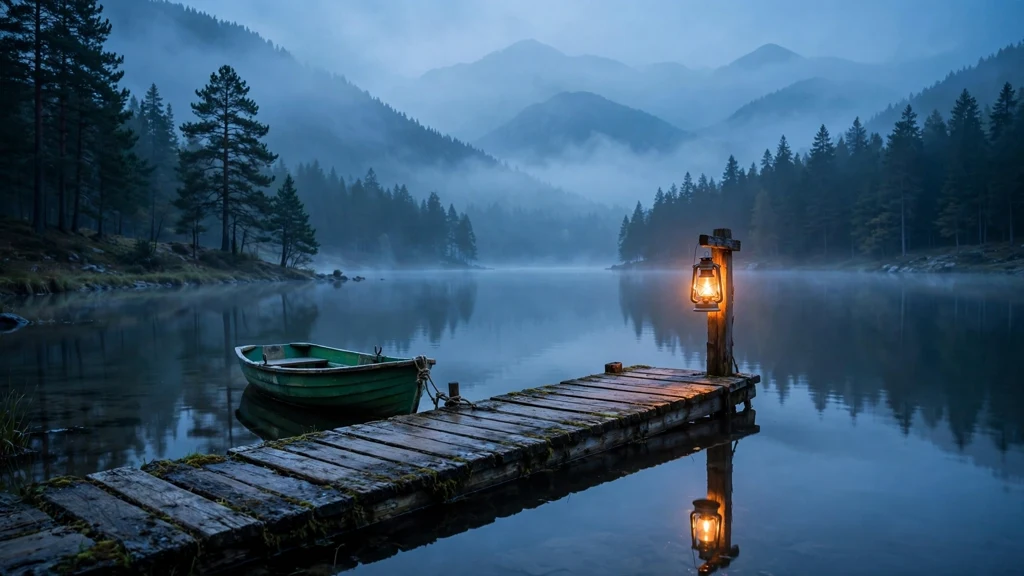
The first nodes just make a calm source clip: Muse paints a weathered wooden dock on a misty mountain lake at blue hour, with a green rowboat and a lantern glowing on a post, and MiniMax H3 Max Turbo (480p, 5 s) animates it with a slow camera drift, flickering lantern, drifting mist and small ripples. The Video edit node then sends that clip to FLUX.3 Edit Video with one instruction: add snow, keep everything else. The result keeps the plain clip's framing, camera move and timing, and the dock boards, the rowboat's rim, the lantern post's cap and the shore are now covered in a layer of fresh snow while the lantern still glows warm against the cold blue. Compare the two clips side by side. Flaws: no falling snowflakes are visible. The instruction asked for flakes drifting past the camera and for the snow to build up over the shot, but FLUX.3 painted the snow as already settled from the first frame and it stays the same to the end, so this reads as "the same shot on a snowy evening" rather than "snow starts falling". The edit is also a little softer than the source in fine detail (pine needles, dock grain). The edit came back at the source's 832×480, not the 720p the model page mentions. It billed 6 s for the 5.17 s source clip ($0.306), more than the 5 s you might expect. To use your own footage, delete the first three nodes and wire a 📹 Video input into the Video edit node. Every still and sampled video frame was checked and is SFW (a lake, a dock and a boat; no people, animals, text or logos). Inspired by @ComfyUI's LTX for VFX post (https://x.com/ComfyUI/status/2112952361765511440). No media from that post is used.
Make it yours
- Open the graph — save first if the canvas already has your work. Undo brings yours back.
- To try it as is, rewrite Scene · prompt and Plain clip · motion prompt for a calm shot of your own. To edit a clip you already have, replace the first three nodes with a 📹 Video input holding it (under 15 s). Then rewrite Effect · edit instruction: say what to add and end with what must stay the same. Try rain, fog, autumn leaves or a different time of day.
- Check the editor estimate, then run with your NanoGPT key. One Muse still at $0.011 + H3 Max Turbo at 480p for 5 s at $0.025/s = $0.125 + FLUX.3 Edit Video at $0.051 per second of source, billed here as 6 s = $0.306. The saved run was $0.442. With your own clip, you pay only the edit.
- Play the plain clip and the edited clip side by side. Check the camera move and timing match, that the new weather sits on the right surfaces, and whether anything is actually moving: here the snow is settled from the first frame and no flakes fall.
Download workflow · Original sampled graph · Explore MCP tools · awesome-noodles