Photo to 3D splat
One photo of one object → a 3D Gaussian splat you can orbit.
Gemini surveys the photo first: the object, the view, its materials and colours, the sides the photo hides, and the fragile details. Idol (Sperid Labs) rebuilds the object as a Gaussian splat — hundreds of thousands of soft coloured points that read as a solid thing from every side. GLM writes the guide that ships with it: what you got, how to open it, and which parts were invented rather than measured.
Saved result
Object survey · Gemini reads the photo · reported $0.0034
Object: Winged dragon figurine mounted on a rectangular plinth. View: Eye-level frontal view with head turned slightly left. Materials and colours: Antiqued bronze with dark patina, on a dark grey stone base. Hidden sides: Posterior side of the wings, rear spine, back of the body, and plinth underside. Fragile details: Thin wing membranes, delicate facial whiskers, sharp horns, and spiky spinal crests.
Splat guide · GLM writes the tour · reported $0.00
WHAT YOU GOT This is a Gaussian splat of a winged dragon figurine on its rectangular plinth: hundreds of thousands of soft coloured points that together read as a solid, orbitable object — antiqued bronze with dark patina over a dark grey stone base. It is delivered as a GLB point-cloud preview. To be plain: this is a point splat, not a polygon mesh. There are no surfaces, no UVs and no textures to edit. Idol also returns a full PLY splat on the raw API, but that is API-only; what you have in hand here is the GLB preview. HOW TO OPEN IT The GLB preview opens in any GLB viewer, or in Blender if you prefer working there. If you fetch the PLY from the API instead, open it in a splat viewer such as SuperSplat, PlayCanvas or most Gaussian-splat tools. THE HONEST EDGES Idol invented every side the photo did not show: the posterior side of the wings, the rear spine, the back of the body and the plinth underside are guesses, not observations. Thin wing membranes, delicate facial whiskers, sharp horns and spiky spinal crests are approximate at best. The splat holds one object only, and its scale is relative, not measured.
References that went in
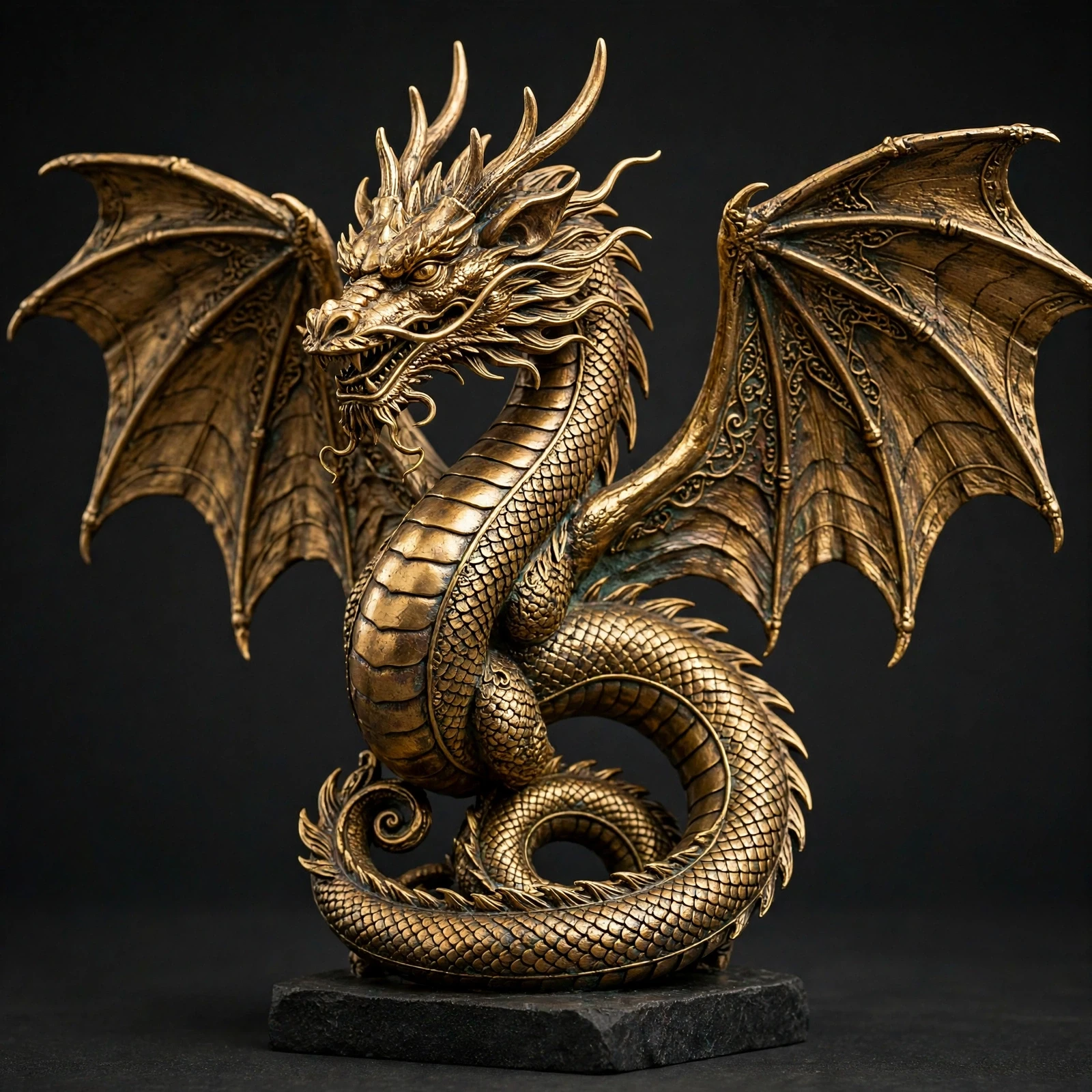
Upload one photo of one object and get back a 3D Gaussian splat of it. Gemini first surveys the photo — the object, the view, its materials and colours, the sides the photo hides, and the fragile details. Idol (Sperid Labs' image-to-3D model, the Hugging Face trending board's top riser of late October) rebuilds the object as a splat: hundreds of thousands of soft coloured points that read as a solid thing from every side. GLM then writes the guide: what you got, how to open it, and the honest edges. In the saved run a photo of an ornate golden dragon statue — antiqued bronze with dark patina, wings spread, coiled on a dark grey stone plinth — came back as a GLB point-cloud preview of 245,428 points: the scales, wing membranes, horns and whiskers all survive as points, and the backs of the wings, the rear spine and the plinth underside the photo never showed are invented, with the guide naming them as inventions rather than measurements. Flaws and limits: a splat is points, not a mesh — no surfaces, UVs or textures to edit, and thin or shiny details are approximate. This graph surfaces the GLB preview; Idol's full PLY splat is returned on the raw API and stays API-only for now. One object per run; scenes and rooms belong to Photo to scene mesh. The turntable is a plain point render of the saved GLB, not a shaded view — orbit the workflow's sampled GLB in the editor for the real thing.
Make it yours
- Open the graph — save first if the canvas already has your work. Undo brings yours back.
- Swap Object photo for your own photo of one object — whole, in frame, on an uncluttered background works best. Keep Rebuild as a splat on
speridlabs/idol; raise Gaussians toward 1,048,576 for a denser splat at the same flat price, and set Image type to Synthetic for tight-cropped renders instead of photographs. - Check the editor estimate, then run with your NanoGPT key. Three model calls: the saved run reported $0.1029 in total (Idol a flat $0.10 at any setting, Gemini survey $0.0029, GLM guide $0.00). Prices and results vary.
- Orbit the saved GLB in the workflow and compare it with the photo: in the saved run the laces, eyelets and panel seams survive as points, and the guide lists the medial side, tread and lining as inventions. A splat is points, not a mesh — there are no surfaces or textures to edit, and the full PLY is returned on the raw API only; this graph surfaces the GLB point-cloud preview.
The editor workflow also points the 3D node at the saved GLB as its sample, so you can orbit the result before running; ▶ Run replaces it. Everything else matches the sampled graph.
Download workflow · Original sampled graph · Explore MCP tools · awesome-noodles