Photo to game-ready mesh
One photo of one object → a textured triangle mesh that drops into engines, Blender and slicers.
Gemini surveys the photo first: the object, the view, its materials and colours, the sides the photo hides, and the fragile details. Idol Max Turbo (Sperid Labs) rebuilds the object as a 30,000-triangle GLB with UVs and embedded PBR textures — real surfaces, not points. GLM writes the guide that ships with it: what you got, where it drops in, and which parts were invented rather than measured.
Saved result
Object survey · Gemini reads the photo · reported $0.0029
Object: Cast metal dragon figurine with outstretched wings coiled on a square plinth View: Front eye-level perspective slightly turned to the left Materials and colours: Antiqued gold-bronze metal with dark patina in recesses, set on a dark grey stone base Hidden sides: Dorsal side of the neck and spine, rear surface of both wings, and underside of the base Fragile details: Slender whiskers, thin pointed horns, sharp dorsal spines, and thin wing membranes with protruding tips
Mesh guide · GLM writes what you got · reported $0.00
What you have is a real polygon mesh of the dragon figurine: 30,000 triangles with UVs, delivered as one GLB with the textures embedded. The textures are 2048px base-colour and normal maps plus metallic-roughness maps, so the antiqued gold-bronze metal and dark patina read correctly under PBR lighting. These are surfaces you can light, edit and print — the thing a Gaussian splat is not. The GLB imports directly into Blender, Unity, Unreal and Godot, and slicers such as PrusaSlicer, Bambu Studio and Cura accept GLB for 3D printing. The model arrives unrigged: character rigging is available as an option, but this workflow leaves it off. The honest edges: Idol invents every side the photo did not show, following the survey's hidden-sides line — the dorsal neck and spine, the rear wing surfaces and the underside of the base. Fine detail lives in the texture maps, not the geometry; 30,000 triangles is a budget, so the slender whiskers, thin horns, dorsal spines and wing membranes are approximate. Thin, shiny or transparent parts are approximate too. The mesh holds one object only, and its scale is relative, not measured.
References that went in
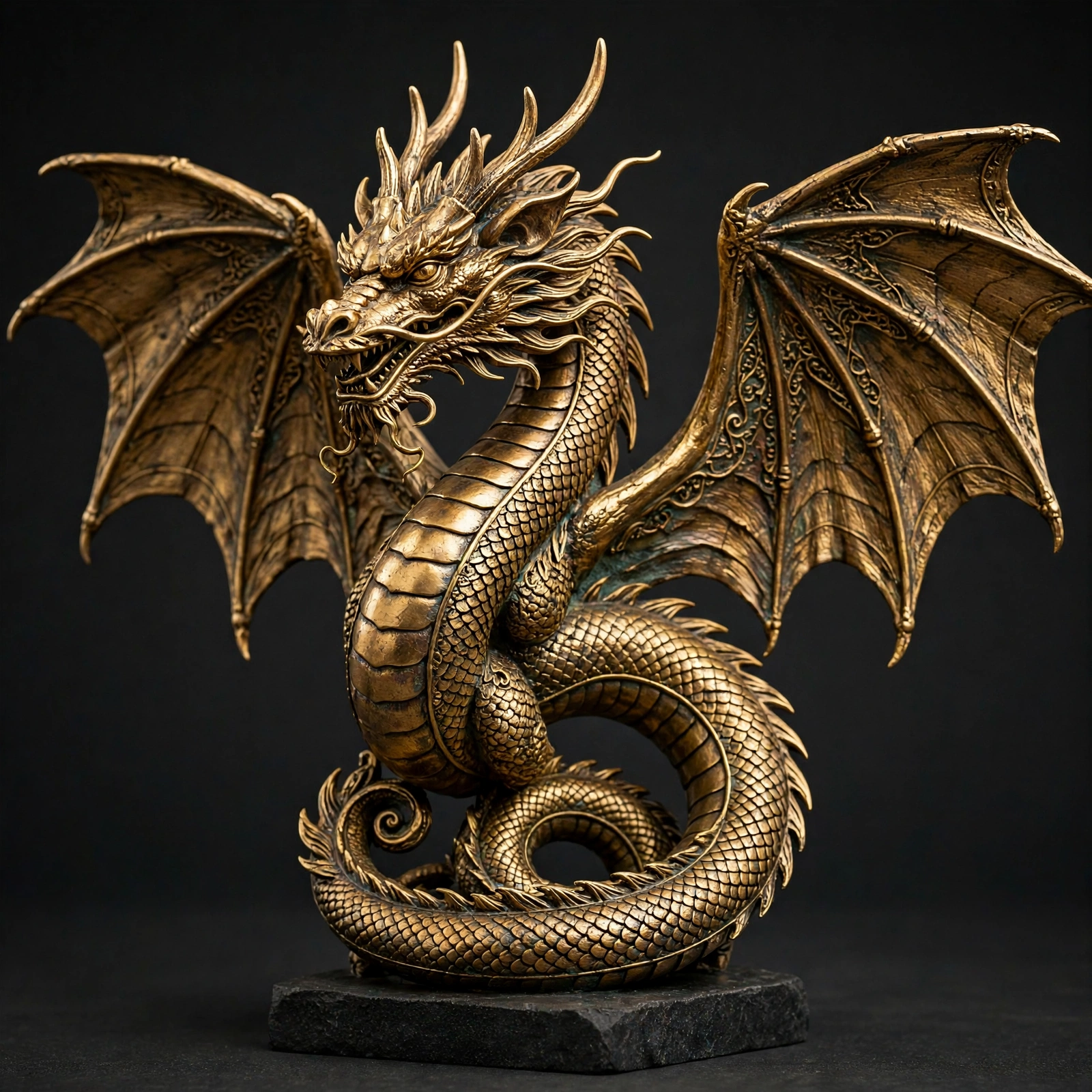
Upload one photo of one object and get back a textured triangle mesh of it. Gemini first surveys the photo — the object, the view, its materials and colours, the sides the photo hides, and the fragile details. Idol Max Turbo (Sperid Labs' mesh line, landed on NanoGPT the same day this example shipped) rebuilds the object as a 30,000-triangle GLB with UVs and the textures embedded — 2048px base-colour and normal maps plus metallic-roughness maps, PBR included in the $0.10. GLM then writes the guide: what you got, where it drops in, and the honest edges. In the saved run the golden dragon statue from Photo to 3D Splat — antiqued bronze with dark patina, wings spread, coiled on a dark grey stone plinth — came back as real surfaces: the wings, scales and plinth are geometry you can light, edit and print, and the guide names the invented sides (dorsal neck and spine, rear wing surfaces, the base's underside) as inventions. Flaws and limits: fine detail lives in the texture maps, not the geometry — 30,000 triangles is a budget, so whiskers, horns and wing membranes are approximate; the mesh arrives unrigged (the model offers rigging as an option, left off here — a rigid statue may not rig, and a failed rig fails the generation); one object per run; scale is relative, not measured. The probe GLB parsed at exactly 30,000 triangles; the saved run's parses at 29,992. Unlike the splat, the mesh GLB is Y-up and renders in the stock viewer — no points path needed. The turntable is a plain flat-shaded render of the saved GLB with its own base-colour texture, not a beauty shot — orbit the workflow's sampled GLB in the editor for the real thing.
Make it yours
- Open the graph — save first if the canvas already has your work. Undo brings yours back.
- Swap Object photo for your own photo of one object — whole, in frame, on an uncluttered background works best. Keep Rebuild as a mesh on
speridlabs/idol/max/turbowith PBR on; for a character or creature, the model's rigging option adds a skeleton and animation clips at $0.125 (rigid props may not rig, and a failed rig fails the run). Idol Max ($0.20) is the stereo-depth quality variant of the same call. - Check the editor estimate, then run with your NanoGPT key. Three model calls: the saved run reported $0.1029 in total (Idol Max Turbo a flat $0.10 with PBR included, Gemini survey $0.0029, GLM guide $0.00). Prices and results vary.
- Orbit the saved GLB in the workflow and compare it with the photo: surfaces and textures this time, not points — then read the guide's honest edges before you build on it. Fine detail lives in the 2048px texture maps, not the geometry; 30,000 triangles is a budget. The saved run's GLB parses at 29,992 triangles with UVs and three embedded maps.
photo-to-game-ready-mesh.NOTE.txt
Download workflow · Original sampled graph · Explore MCP tools · awesome-noodles